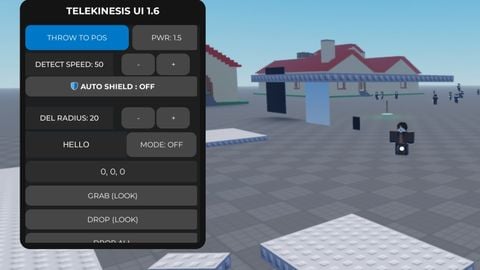
Telekinesis Ui

Does it work?
No reports yetNo reports yet. Tried it? Be the first to say.
Description
Crosshair Highlight(on/off) Grab(Look) Drop(Look) Drop(All) Freeze(Look) --You need grab First and click Freeze Unfreeze(Look) Unfreeze(All) Auto Grab NPC Auto Grab part Auto freeze --You can turn on this and after turn on auto other features it will auto freeze to Auto throw --Dont turn on any auto to Throw(Look) Distance setting --it you network radius/network owner Move Mode --this will show list part you freeze and you can click to select that or select all it will highlight that part you select And show ui move Delete Part(Look) --this like you throw part for high speed Auto delete part Follow Owner --You need grab or freeze part after that That part will follow you Puppet Master Mode --Click the npc that you want control And click start control Throw To Position (Get the Position and put in the UI after you throw part it will throw that position) Auto Shield(Detect Speed that setting and auto freeze that) Car Mode --Click turn on and click the part that you want to that be car And More features in ui


fe?