2.3k Views
1.5k Executions
Speed Setter
Universal Script 📌
ddorredorePublished 10
1 year ago
Please login to perform these actions:Does it work?
No reports yetNo reports yet. Tried it? Be the first to say.
Also noticed:
Description
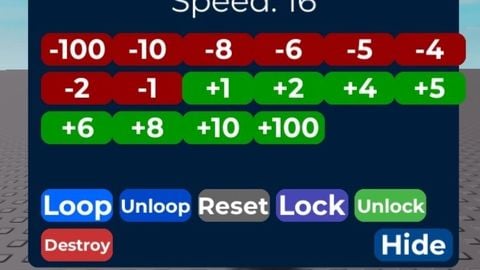
local player = speed setter gui lets you control your walk speed in a draggable gui with buttons to increase, decrease, loop, reset, lock, unlock, hide, or destroy - draggable and resizable - loop option to continuously enforce speed - live update on respawn - multiple preset speed increments (+/-1,2,4,5,6,8,10,100) - hide/collapse gui for minimal screen space made this to easily test and adjust walk speed while playing client-side
-- LocalScript inside StarterPlayerScripts

local Players = game:GetService("Players")
local UIS = game:GetService("UserInputService")
local RS = game:GetService("RunService")

local player = Players.LocalPlayer
local gui = Instance.new("ScreenGui", player:WaitForChild("PlayerGui"))
gui.Name = "SpeedGui"
gui.ResetOnSpawn = false

-- Setup values
local character = player.Character or player.CharacterAdded:Wait()
local humanoid = character:WaitForChild("Humanoid")
local originalSpeed = humanoid.WalkSpeed
local currentSpeed = originalSpeed
local dragging = false
local loopEnabled = false
local locked = false
local collapsed = false
local loopConn

-- GUI Base
local main = Instance.new("Frame")
main.Name = "MainFrame"
main.Size = UDim2.new(0, 330, 0, 250)
main.Position = UDim2.new(0.2, 0, 0.2, 0)
main.BackgroundColor3 = Color3.fromRGB(0, 30, 60)
main.Active = true
main.Draggable = true
main.Parent = gui
Instance.new("UICorner", main)

-- Title
local title = Instance.new("TextLabel", main)
title.Size = UDim2.new(1, 0, 0, 30)
title.BackgroundTransparency = 1
title.Text = "Speed Setter"
title.TextColor3 = Color3.fromRGB(0, 255, 255)
title.Font = Enum.Font.GothamBold




don't wanna be a hater but this is completely pointless
Ok