Script work in any exutecur and script don't have virus
1

Reviewed by QueueSpeedDemonPaid revieweron How review works
No reports yet. Tried it? Be the first to say.
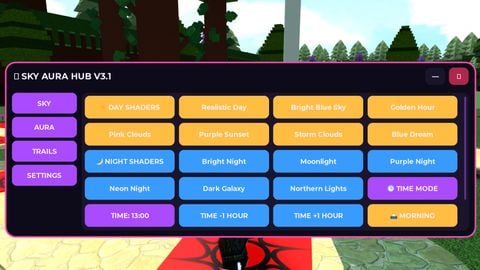
Sky Aura Hub – Universal Sky Shader Script Sky Aura Hub is a universal script designed to enhance the visual appearance of the sky in supported Roblox experiences. 1. Main Purpose The primary purpose of Sky Aura Hub is to improve the game's atmosphere by applying visual sky shaders and effects. It allows users to customize the sky and create a more beautiful and immersive environment. 2. Main Functionality - Applies visual shaders and sky effects. - Enhances the overall appearance of the game environment. - Changes the visual atmosphere of the sky. - Provides a simple way to activate the script. 3. How to Use 1. Open a compatible Roblox executor. 2. Copy the Sky Aura Hub script. 3. Paste the script into the executor's script input field. 4. Execute the script. 5. The script will start applying its sky visual effects. 4. Compatibility Sky Aura Hub is designed as a universal script for use in supported Roblox experiences. 5. Requirements - Roblox. - A compatible script executor. - An internet connection if required by the executor. 6. Restrictions There are currently no additional user restrictions. 7. Project Goal The goal of Sky Aura Hub is to provide users with an easy-to-use visual enhancement tool that improves the sky and overall atmosphere of Roblox games. Sky Aura Hub is intended for visual customization and does not claim to provide gameplay advantages.
Script work in any exutecur and script don't have virus
--==================================================
-- SKY AURA HUB V3.1 | DAY / NIGHT / TIME EDITION
-- Roblox LocalScript
-- Tablet / Phone / PC
--==================================================

local Players = game:GetService("Players")
local Lighting = game:GetService("Lighting")
local TweenService = game:GetService("TweenService")
local UIS = game:GetService("UserInputService")
local RunService = game:GetService("RunService")

local player = Players.LocalPlayer
local playerGui = player:WaitForChild("PlayerGui")

-- CLEANUP OLD GUI
local old = playerGui:FindFirstChild("SkyAuraV3")
if old then old:Destroy() end

-- COLORS
local PURPLE = Color3.fromRGB(170, 75, 255)
local BLUE = Color3.fromRGB(55, 155, 255)
local PINK = Color3.fromRGB(255, 70, 180)
local GREEN = Color3.fromRGB(60, 255, 165)
local GOLD = Color3.fromRGB(255, 190, 65)
local WHITE = Color3.fromRGB(245, 240, 255)
local DARK = Color3.fromRGB(13, 11, 25)
local PANEL = Color3.fromRGB(27, 21, 43)

--==================================================
-- GUI
--==================================================

local gui = Instance.new("ScreenGui")
gui.Name = "SkyAuraV3"
gui.ResetOnSpawn = false
gui.IgnoreGuiInset = true
gui.DisplayOrder = 100
gui.Parent = playerGui


Script hub