
Does it work?
No reports yetNo reports yet. Tried it? Be the first to say.
Description
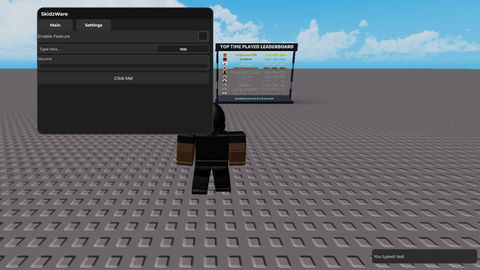
🔹 UI Framework (SkidzWare) Custom UI library Provides helpers: CreateTab(name) → make new UI sections. CreateButton(label, callback) → clickable buttons. CreateToggle(label, callback) → on/off switches. CreateTextbox(placeholder, callback) → input fields. CreateSlider(label, min, max, callback) → adjustable sliders. Notify(message, duration) → clean notification popups. Includes main draggable window with topbar. Has a loading screen with progress bar (time adjustable inside the lib). 🔹 Tabs & Layout Two tabs by default: Main tab (buttons, toggle, textbox, slider). Settings tab (menu toggle keybind). Tabs are switchable within the UI. 🔹 Main Tab Features Button → click logs to console + shows notification. Toggle → switch on/off, logs state + shows notification. Textbox → User can type input. Box shrunk to ~30% width for a cleaner look. Logs typed text + shows notification. Slider → Range 0 → 100. Label text sits above the slider (no overlap). Adjusting logs value to console. 🔹 Menu Toggle (Keybind System) Menu visibility can be toggled on/off with a key press. User sets the key through a textbox in the Settings tab. Features of keybind system: Accepts both lowercase & uppercase letters (e.g., r or R). Supports special keys: rightshift, leftshift, space, tab, enter, escape, capslock, ctrl, alt. (cant be in shiftlock mode for it working on it) On key press → toggles menu visibility + shows notification. 🔹 Notifications System Built-in popup messages (SkidzWare.Notify). Used for: Confirming button clicks. Toggle state changes. Textbox submissions. Slider adjustments. Keybind set success/failure. Menu show/hide events. 🔹 Expandability Easy to add new UI elements: More tabs (e.g., "ESP", "Aimbot", "Fun"). More buttons, toggles, sliders, textboxes. Everything stays clean and consistent with the SkidzWare style. 👉 In short: Your script is a full local UI framework + example menu that: Has draggable, styled UI with tabs. Includes button, toggle, textbox, slider. Allows user-defined keybind to hide/show the menu. Provides clean notifications for feedback. Fully customizable and expandable. Join the discord and enjoy this is a project i will be constantly updating it but nothing will be messsed with on the loadstring so feel free to do whatever with it any updated i will edit this)
local url = "https://raw.githubusercontent.com/randomuser832/R22222222222222/refs/heads/main/SkidzUiLib.lua"

local SkidzWare
local success, err = pcall(function()
    local source = game:HttpGet(url)
    SkidzWare = loadstring(source)()
end)


if not success then
    warn("Failed to load SkidzWare UI Library: "..tostring(err))
    return
end


local tab1 = SkidzWare:CreateTab("Main")
local tab2 = SkidzWare:CreateTab("Settings")

-- Add Button
tab1.CreateButton("Click Me!", function()
    print("Button clicked!")
    SkidzWare.Notify("Button Clicked!",3)
end)

tab1.CreateToggle("Enable Feature", function(state)
    print("Toggle is now:", state)
end)


-- Add Textbox
tab1.CreateTextbox("Type here...", function(text)
    print("Textbox input:", text)
    SkidzWare.Notify("You typed: "..text,2)
end)

-- Add Slider
tab1.CreateSlider("Volume",0,100,function(val)
    print("Slider value:", math.floor(val))
end)






[deleted]
@Tyrone_darealest
obfuscating a ui library is top ten loser moves