521 Views
344 Executions
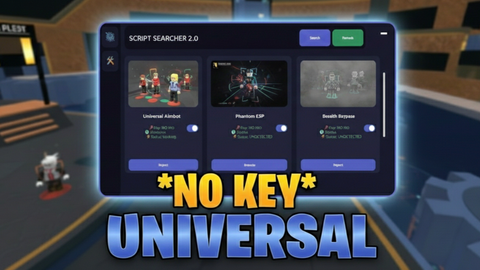
Seacher script 1.0 2026 keyless
Universal Script 📌
Edson_77710K executions
9 months ago
Please login to perform these actions:Does it work?
No reports yetNo reports yet. Tried it? Be the first to say.
Also noticed:
Description
(Put this script in the autoexecute folder.) This script searches for information on whether a script has a key or if it's free, which is a good benefit. This is version 2. 0If you need fixes, please leave feedback in the comments.
Updates
Script edited: Update script
Script edited: Update script
Script edited: Update script
local player = game.Players.LocalPlayer
local httpService = game:GetService("HttpService")
local coreGui = game:GetService("CoreGui")
local userInput = game:GetService("UserInputService")
local marketService = game:GetService("MarketplaceService")
local runService = game:GetService("RunService")

-- [ESTADO E TRADUÇÕES]
local currentLang = "PT"
local translations = {
    PT = { congrats = "Parabéns", search = "Buscar", refresh = "Recarregar", clear = "Limpar", execute = "Executar", key = "Key:", universal = "Universal:" },
    EN = { congrats = "Congratulations", search = "Search", refresh = "Refresh", clear = "Clear", execute = "Execute", key = "Key:", universal = "Universal:" },
    ES = { congrats = "Felicitaciones", search = "Buscar", refresh = "Refrescar", clear = "Limpiar", execute = "Ejecutar", key = "Key:", universal = "Universal:" }
}

local success, productInfo = pcall(function() return marketService:GetProductInfo(game.PlaceId) end)
local cleanGameName = success and productInfo.Name:gsub("[^\32-\126]", ""):gsub("[%p%c]", " "):gsub("%s+", " "):match("^%s*(.-)%s*$") or "Universal"

local sg = Instance.new("ScreenGui", coreGui); sg.Name = "SupremeHub_V70"

-- [FUNÇÃO DE ARRASTE ATUALIZADA]
local function makeDraggable(gui)
    local dragging, dragInput, dragStart, startPos

    local function update(input)
        local delta = input.Position - dragStart
        gui.Position = UDim2.new(startPos.X.Scale, startPos.X.Offset + delta.X, startPos.Y.Scale, startPos.Y.Offset + delta.Y)
    end

    gui.InputBegan:Connect(function(input)
        if input.UserInputType == Enum.UserInputType.MouseButton1 or input.UserInputType == Enum.UserInputType.Touch then
            dragging = true
            dragStart = input.Position
            startPos = gui.Position

            input.Changed:Connect(function()
                if input.UserInputState == Enum.UserInputState.End then
                    dragging = false
                end
            end)


Good
you able to make the icon draggable! some games it lands on the game icons like store and i cant click on it
@RobinsonF Okay, I can fix that.
@RobinsonF Regarding your suggestion: It's resolved! I just updated the script and now the 'H' (Minimize) button is fully draggable. You can move it anywhere on the screen so it no longer interferes with the other buttons. Thks
love!! one of the cleanest ones i have came acrossed awesome job!!
@RobinsonF I just updated the script, could you take a look at the result?