8.7k Views
28 Executions
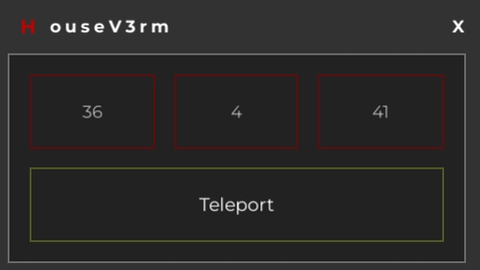
Script coordinates Teleport
Universal Script 📌
00000002Published 5
2 years ago
Please login to perform these actions:Does it work?
No reports yetNo reports yet. Tried it? Be the first to say.
Also noticed:
Description
for this you will need a code that I will give you and a coordinates script with which you know the location. Hey, this script isn't mine, I got it from YouTube
player.Character.HumanoidRootPart.CFrame = CFrame.new(teleportPosition)
local S = Instance.new("ScreenGui")
local L = Instance.new("Frame")
local D = Instance.new("Frame")
local T = Instance.new("TextButton")
local X = Instance.new("TextBox")
local Z = Instance.new("TextBox")
local Y = Instance.new("TextBox")
local V = Instance.new("TextLabel")
local H = Instance.new("TextLabel")
local C = Instance.new("TextButton")

--- This sets the PlaceHolderText to the players current CFrame ---
local P = game.Players.LocalPlayer.Character.HumanoidRootPart
local CF = P.CFrame
local Cx, Cy, Cz, m11, m12, m13, m21, m22, m23, m31, m32, m33 = CF:components()
--- This sets the PlaceHolderText to the players current CFrame ---

S.Name = "S"
S.Parent = game:WaitForChild("CoreGui")
S.ZIndexBehavior = Enum.ZIndexBehavior.Sibling

L.Name = "L"
L.Parent = S
L.BackgroundColor3 = Color3.fromRGB(50, 50, 50)
L.BorderColor3 = Color3.fromRGB(110, 110, 110)
L.Position = UDim2.new(0.321100891, 0, 0.282937378, 0)
L.Size = UDim2.new(0, 350, 0, 200)
L.Active = true
L.Draggable = true

D.Name = "D"
D.Parent = L
D.BackgroundColor3 = Color3.fromRGB(34, 34, 34)
D.BorderColor3 = Color3.fromRGB(110, 110, 110)
D.Position = UDim2.new(0.042857144, 0, 0.200000003, 0)
D.Size = UDim2.new(0, 320, 0, 145)

T.Name = "T"




I just posted the teleport code with this script, show the coordinates you are in, take that code and write the position, example: Vector3.new 0,10,0 with the script, show the coordinates and by changing the numbers you teleport
I will post the teleport code