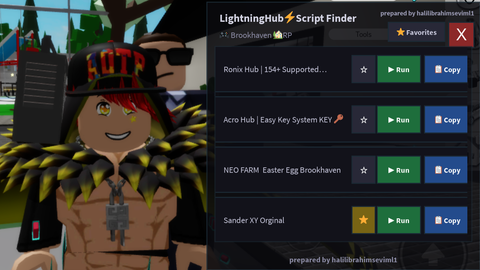
Script Finder-No Key

Does it work?
Early reports100% say it works · 1 report in the last 2 weeks
Description
Here are the features of the Mobile Script Finder (LightningHub) Roblox Lua script: ScriptBlox Integration: Automatically detects the name or PlaceId of the game you are playing and fetches related scripts directly from ScriptBlox services. Persistent Favorites System: Allows you to add or remove scripts to and from your favorites. Data is saved locally on your device in .json format using writefile and readfile. UI & Usability: Features a draggable main panel and a toggle button in the top-left corner for easy access. Designed with a compact, mobile-friendly layout. Quick Action Buttons: ▶ Run: Directly executes scripts in-game using loadstring. 📋 Copy: Copies the script code to your clipboard via setclipboard. ⭐ Favorites Tab: Lets you seamlessly switch between your saved favorite scripts and the full list of scripts for the game. Key Indicator: Automatically appends a KEY 🔑 tag to script titles that require an access key. Error Handling & Feedback: Provides instant visual feedback on buttons (such as ✅, ❌, or ⚠️ ErrorLight) when executing or copying scripts.
loadstring(game:HttpGet("https://raw.githubusercontent.com/halilibrahimseviml1/Script-finder/refs/heads/main/metin.txt"))()




my discord server: https://discord.gg/Ewbfhrzgf