468 Views
58 Executions
Screen coordinates grabber open source universal
Universal Script 📌
skeepl10K executions
7 months ago
Please login to perform these actions:Does it work?
No reports yetNo reports yet. Tried it? Be the first to say.
Also noticed:
Description
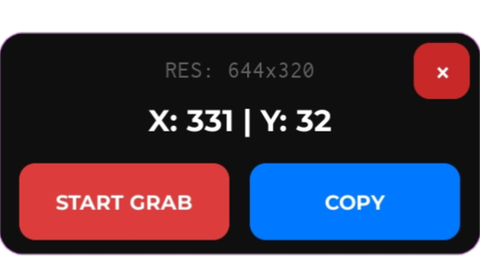
Use this when you need to grab the coordinates of your screen in a Roblox game. Useful for making auto tappers.
local UIS = game:GetService("UserInputService")
local PLRS = game:GetService("Players")
local WSP = game:GetService("Workspace")

local lp = PLRS.LocalPlayer
local parent = (gethui and gethui()) or lp:WaitForChild("PlayerGui")

local cam = WSP.CurrentCamera
local sw, sh = math.floor(cam.ViewportSize.X), math.floor(cam.ViewportSize.Y)

local sg = Instance.new("ScreenGui")
sg.Name = "CoordGrabber_Pro"
sg.ResetOnSpawn = false
sg.IgnoreGuiInset = true
sg.DisplayOrder = 999
sg.Parent = parent

local shield = Instance.new("TextButton")
shield.Size = UDim2.new(1, 0, 1, 0)
shield.BackgroundTransparency = 1
shield.Text = ""
shield.Visible = false
shield.Active = true
shield.ZIndex = 5
shield.Parent = sg

local mf = Instance.new("Frame")
mf.Size = UDim2.new(0, 240, 0, 110)
mf.Position = UDim2.new(0.5, -120, 0, 50)
mf.BackgroundColor3 = Color3.fromRGB(15, 15, 15)
mf.BorderSizePixel = 0
mf.ZIndex = 10
mf.Active = true
mf.Parent = sg

local mfC = Instance.new("UICorner")
mfC.CornerRadius = UDim.new(0, 12)
mfC.Parent = mf

local close = Instance.new("TextButton")
Comments
0Log in to join the conversation. Login
No comments yet. Be the first!