3.4k Views
36 Executions

Does it work?
No reports yetNo reports yet. Tried it? Be the first to say.
Also noticed:
Description
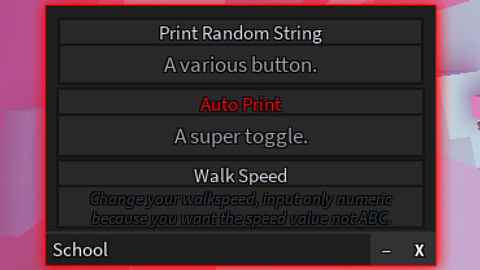
Only have 3 elements: Text Box Toggle Button School is the name of the UI Lib.
--[[ skip the rAnDoMsTrInG function below if you are unsure how to use this UI Library to script your own + removing the function is entirely up to you ]]
function randomString()
	local length = math.random(50,50)
	local array = {}
	for i = 1, length do
		array[i] = string.char(math.random(32, 126))
	end
	return table.concat(array)
end

--[[ all the lines after 13, after this comment, are what you should look at closely ]]
local components = loadstring(game:HttpGet("https://raw.githubusercontent.com/frzfrsy/School/main/source.lua"))()

local form = components:New(
	"School", --Title of the form
	Color3.new(1, 0, 0), --Smoke colour (you can use fromHSV or fromHex or fromRGB)
	Color3.new(1, 0, 0), --Outline colour (you can use fromHSV or fromHex or fromRGB)
	0 --Smoke thickness (0 to 1, 0 is opaque, 1 is transparent, use decimals if needed)
)

--[[ BUTTON ]]
form:Button("Print Random String", "A various button.", function()
	print(randomString()) -- rAnDoMsTrInG in used.
end)

--[[ TOGGLE ]]
form:Toggle("Auto Print", "A super toggle.", function(state)
	if state then
		print(state)
	else
		print(state)
	end
end)
 --[[ TEXT BOXES ]]
form:TextBox("Walk Speed", "Change your walk speed, input only numeric because you want the speed value not ABC.", function(val)
	game.Players.LocalPlayer.Character.Humanoid.WalkSpeed = val
end)

form:TextBox("Jump Power", "Change your jump power, input only numeric because you want the power value not ABC.", function(val)
	game.Players.LocalPlayer.Character.Humanoid.JumpPower = val





@Dayum1, rate zero to one hundred
Its cool i think
0/100