2.4k Views
260 Executions

Does it work?
No reports yetNo reports yet. Tried it? Be the first to say.
Also noticed:
Description
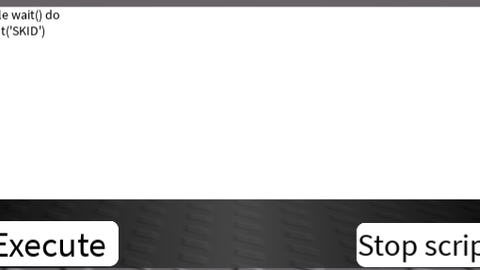
This is the executor, but you can stop the executed script. For example, the script is laggy and you need to stop it, but you don't want to rejoin the game. THIS IS SCRIPT!!! For testing you can try this: while wait() do print('SKID') end The stop button should stop the script
local Executor = Instance.new("ScreenGui")
local Frame = Instance.new("Frame")
local UIGradient = Instance.new("UIGradient")
local Code = Instance.new("TextBox")
local UICorner = Instance.new("UICorner")
local UICorner_2 = Instance.new("UICorner")
local Exec = Instance.new("TextButton")
local UICorner_3 = Instance.new("UICorner")
local stop = Instance.new("TextButton")
local UICorner_4 = Instance.new("UICorner")

Executor.Name = "Executor"
Executor.Parent = game.CoreGui.RobloxGui
Executor.ZIndexBehavior = Enum.ZIndexBehavior.Sibling

Frame.Parent = Executor
Frame.BackgroundColor3 = Color3.fromRGB(255, 255, 255)
Frame.BorderColor3 = Color3.fromRGB(0, 0, 0)
Frame.BorderSizePixel = 0
Frame.Active = true
Frame.Draggable = true
Frame.Position = UDim2.new(0.5, -277, 0.5, -184)
Frame.Size = UDim2.new(0.287237287, 0, 0.299999982, 0)

UIGradient.Color = ColorSequence.new{ColorSequenceKeypoint.new(0, Color3.fromRGB(0, 0, 0)), ColorSequenceKeypoint.new(0.50, Color3.fromRGB(65, 65, 65)), ColorSequenceKeypoint.new(1, Color3.fromRGB(0, 0, 0))}
UIGradient.Rotation = 0
UIGradient.Transparency = NumberSequence.new{NumberSequenceKeypoint.new(0, 0.15), NumberSequenceKeypoint.new(1, 0.15)}
UIGradient.Parent = Frame

Code.Name = "Code"
Code.Parent = Frame
Code.BackgroundColor3 = Color3.fromRGB(255, 255, 255)
Code.BorderColor3 = Color3.fromRGB(0, 0, 0)
Code.BorderSizePixel = 0
Code.Size = UDim2.new(1, 0, 0.739295781, 0)
Code.ClearTextOnFocus = false
Code.Font = Enum.Font.SourceSans
Code.MultiLine = true
Code.PlaceholderColor3 = Color3.fromRGB(200, 200, 200)
Code.Text = ""







no💀
server side?