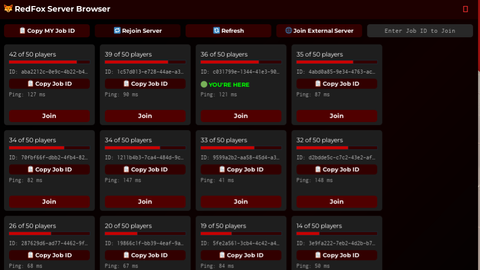
RedFox Server Bowser
Universal Script 📌
Does it work?
No reports yetNo reports yet. Tried it? Be the first to say.
Description
🦊 RedFox Server Browser ========================= DESCRIPTION: ------------ RedFox Server Browser is a custom Roblox UI tool that lets you browse, join, and manage public servers in any game you're currently playing. It uses a dark red-themed interface and provides utility buttons for teleporting, copying server Job IDs, and monitoring simulated ping. FEATURES: --------- ✔ Live Server List: - Displays up to 100 active public servers for the current game. ✔ Join Button: - Join any server instantly via a “Join” button. ✔ Player Count: - Shows number of players currently in each server. ✔ Simulated Ping: - Displays ping (between 40–150ms, auto-updates every second). ✔ Copy Job ID (per server): - Each server card includes a “📋 Copy Job ID” button to copy its unique identifier. ✔ Copy MY Job ID: - A button that copies your current Job ID (game.JobId) to clipboard. ✔ Manual Job ID Join: - Enter any server Job ID manually and teleport directly. ✔ RedFox Theme: - Custom UI with red/black styling, gradients, rounded corners, and hover effects. REMOVED FEATURES: ----------------- ✘ Refresh Button (was causing race conditions) ✘ Sort by Player Count or Ping ✘ Hide Full Servers USAGE: ------ 1. Execute the script in your Roblox executor. 2. View the list of public servers. 3. Click "Join" or "Copy Job ID" for any server. 4. Use the textbox to manually teleport via Job ID. 5. Use “📋 Copy MY Job ID” to share your current server. Updates: Added 📋 "Copy MY Job ID" button Added 🔁 "Rejoin Server" button Added 🔁 "Refresh" button (rebuilds UI) Added 🟢 "YOU'RE HERE" label for current server Hid 📋 "Copy Job ID" button for current server Fixed scroll canvas resizing bug Fixed server duplication after refresh Made UI fully draggable Applied RedFox gradient + rounded corners Server ping updates every 1s Proper "Join" button hover effect TextBoxes now support Enter-to-join Added External Game join panel All UI uses consistent red/black RedFox theme




pretty good
script dosent show
there is a reason why its a link and not the script please wait for full website
what i like the emojis :(
Sorry I was testing a new loader
Updated!
Roblox does not provide uptime data through the public API (https://games.roblox.com/v1/games/...). So unless you: Add this logic inside every server of your own game, OR Use an external server list hosted yourself (via Node.js or Python backend), you can’t get real uptime across other people’s games or servers.