58.5k Views
1.2k Executions
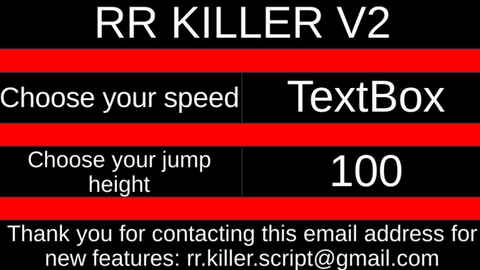
RR KILLER V2
Universal Script 📌
royrayane38First script
2 years ago
Please login to perform these actions:Does it work?
No reports yetNo reports yet. Tried it? Be the first to say.
Also noticed:
Description
This is a V2 of the first script if you want other functionality contact me at this email address : rr.killer.script@gmail.com
-- Local Script (Place this in StarterGui)

local player = game.Players.LocalPlayer
local mouse = player:GetMouse()

-- Create the GUI
local screenGui = Instance.new("ScreenGui")
screenGui.Parent = player:WaitForChild("PlayerGui")

local mainFrame = Instance.new("Frame")
mainFrame.Parent = screenGui
mainFrame.Size = UDim2.new(0, 400, 0, 200)
mainFrame.Position = UDim2.new(0.5, -200, 0.5, -100)
mainFrame.BackgroundColor3 = Color3.fromRGB(255, 0, 0)
mainFrame.Draggable = true -- Allows the menu to be moved
mainFrame.Active = true -- Makes the menu interactive
mainFrame.Selectable = true -- Makes the menu selectable

local titleLabel = Instance.new("TextLabel")
titleLabel.Parent = mainFrame
titleLabel.Size = UDim2.new(1, 0, 0.2, 0)
titleLabel.Position = UDim2.new(0, 0, 0, 0)
titleLabel.Text = "RR KILLER V2"
titleLabel.TextScaled = true
titleLabel.BackgroundColor3 = Color3.fromRGB(0, 0, 0)
titleLabel.TextColor3 = Color3.fromRGB(255, 255, 255)

-- Label for speed
local speedLabel = Instance.new("TextLabel")
speedLabel.Parent = mainFrame
speedLabel.Size = UDim2.new(0.5, 0, 0.2, 0)
speedLabel.Position = UDim2.new(0, 0, 0.3, 0)
speedLabel.Text = "Choose your speed"
speedLabel.TextScaled = true
speedLabel.BackgroundColor3 = Color3.fromRGB(0, 0, 0)
speedLabel.TextColor3 = Color3.fromRGB(255, 255, 255)

-- Input box for speed
local speedInput = Instance.new("TextBox")
speedInput.Parent = mainFrame
Comments
0Log in to join the conversation. Login
No comments yet. Be the first!