54.6k Views
4.1k Executions
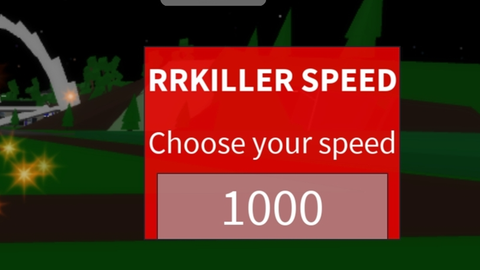
RR KILLER SPEED
Universal Script 📌
royrayane38First script
2 years ago
Please login to perform these actions:Does it work?
No reports yetNo reports yet. Tried it? Be the first to say.
Also noticed:
Description
Ce script peut nous permettre d'augmenter sa vitesse de 1-1000
-- RRKILLER SPEED Script

local players = game:GetService("Players")
local player = players.LocalPlayer
local character = player.Character or player.CharacterAdded:Wait()
local humanoid = character:WaitForChild("Humanoid")

-- Default speed variable
local defaultSpeed = 16 -- Default walking speed
local speed = defaultSpeed -- Current speed

-- Function to create the UI
local function createUI()
    local ScreenGui = Instance.new("ScreenGui", player.PlayerGui)
    local Frame = Instance.new("Frame", ScreenGui)
    Frame.Position = UDim2.new(0.5, -100, 0.5, -50)
    Frame.Size = UDim2.new(0, 200, 0, 150)
    Frame.BackgroundColor3 = Color3.fromRGB(255, 0, 0) -- Red background color
    Frame.BackgroundTransparency = 0.2
    Frame.Active = true
    Frame.Draggable = true -- Make the frame draggable

    local TitleLabel = Instance.new("TextLabel", Frame)
    TitleLabel.Size = UDim2.new(1, 0, 0.33, 0)
    TitleLabel.Text = "RRKILLER SPEED"
    TitleLabel.TextColor3 = Color3.fromRGB(255, 255, 255)
    TitleLabel.BackgroundTransparency = 1
    TitleLabel.Font = Enum.Font.SourceSansBold
    TitleLabel.TextScaled = true

    local TextLabel = Instance.new("TextLabel", Frame)
    TextLabel.Position = UDim2.new(0, 0, 0.33, 0)
    TextLabel.Size = UDim2.new(1, 0, 0.33, 0)
    TextLabel.Text = "Choose your speed"
    TextLabel.TextColor3 = Color3.fromRGB(255, 255, 255)
    TextLabel.BackgroundTransparency = 1
    TextLabel.Font = Enum.Font.SourceSans
    TextLabel.TextScaled = true

    local TextBox = Instance.new("TextBox", Frame)
Comments
0Log in to join the conversation. Login
No comments yet. Be the first!