3.7k Views
29 Executions
Player Count GUI
Universal Script 📌
ddorredorePublished 10
2 years ago
Please login to perform these actions:Does it work?
No reports yetNo reports yet. Tried it? Be the first to say.
Also noticed:
Description
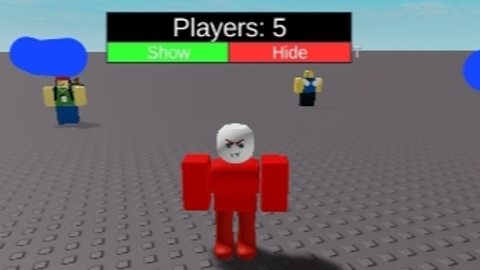
local player = player count display shows the current number of players in the server in a small gui - draggable (works on mobile) - live update when players join or leave - toggle buttons to show/hide text made this so I could always see how many players are in the game client-side
local player = game.Players.LocalPlayer
local players = game:GetService("Players")

-- Create Player Count GUI
local screenGui = Instance.new("ScreenGui")
screenGui.Parent = player:WaitForChild("PlayerGui")

local frame = Instance.new("Frame")
frame.Size = UDim2.new(0.25, 0, 0.12, 0)
frame.Position = UDim2.new(0.05, 0, 0.7, 0) -- Adjust position as needed
frame.BackgroundColor3 = Color3.fromRGB(30, 30, 30)
frame.BackgroundTransparency = 0.3
frame.Active = true
frame.Draggable = true -- Make it moveable
frame.Parent = screenGui

local playerText = Instance.new("TextLabel")
playerText.Size = UDim2.new(1, 0, 0.6, 0)
playerText.Position = UDim2.new(0, 0, 0, 0)
playerText.BackgroundColor3 = Color3.fromRGB(0, 0, 0)
playerText.TextColor3 = Color3.fromRGB(255, 255, 255)
playerText.TextScaled = true
playerText.Text = "Players: 0"
playerText.Parent = frame

-- Create Show Button
local showButton = Instance.new("TextButton")
showButton.Size = UDim2.new(0.5, 0, 0.4, 0)
showButton.Position = UDim2.new(0, 0, 0.6, 0)
showButton.BackgroundColor3 = Color3.fromRGB(50, 255, 50)
showButton.TextColor3 = Color3.fromRGB(255, 255, 255)
showButton.TextScaled = true
showButton.Text = "Show"
showButton.Parent = frame

-- Create Hide Button
local hideButton = Instance.new("TextButton")
hideButton.Size = UDim2.new(0.5, 0, 0.4, 0)
hideButton.Position = UDim2.new(0.5, 0, 0.6, 0)
hideButton.BackgroundColor3 = Color3.fromRGB(255, 50, 50)




Bro I saw u like 1ms ago
If in game type your username