3.2k Views
1.4k Executions
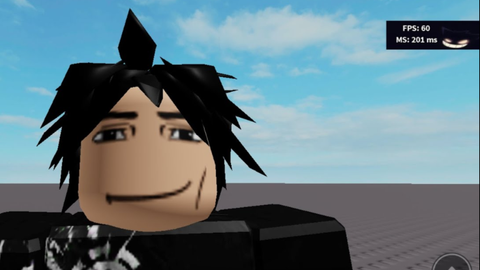
Ping and fps counter
Universal Script 📌
Unknown_personPublished 5
2 years ago
Please login to perform these actions:Does it work?
No reports yetNo reports yet. Tried it? Be the first to say.
Also noticed:
Description
Ping and fps counter script universal Please subscribe to my YouTube https://youtube.com/@carlll_54321?si=TxsYG84iBlqLDY9X
local RunService = game:GetService("RunService")
local Stats = game:GetService("Stats")
local Players = game:GetService("Players")
local StarterGui = game:GetService("StarterGui")

-- Show Notification
StarterGui:SetCore("SendNotification", {
    Title = "romans 15:13";
    Text = "script Made by ryu949";
    Duration = 20; -- Notification stays for 20 seconds
})

-- Create UI
local screenGui = Instance.new("ScreenGui", game.CoreGui)

local frame = Instance.new("Frame", screenGui)
frame.Size = UDim2.new(0.15, 0, 0.1, 0)
frame.Position = UDim2.new(0.85, 0, 0.0001, 0)
frame.BackgroundTransparency = 1  -- Keep it transparent

-- Image Background
local background = Instance.new("ImageLabel", frame)
background.Size = UDim2.new(1, 0, 1, 0)
background.Position = UDim2.new(0, 0, 0, 0)
background.Image = "rbxassetid://131928643682688"  -- Change to your new image ID
background.ScaleType = Enum.ScaleType.Stretch
background.BackgroundTransparency = 1

-- FPS Label (Left Side)
local fpsLabel = Instance.new("TextLabel", frame)
fpsLabel.Size = UDim2.new(0.5, 0, 0.3, 0)  -- Adjusted size
fpsLabel.Position = UDim2.new(0.05, 0, 0.1, 0)  -- Left aligned
fpsLabel.TextColor3 = Color3.new(1, 1, 1)
fpsLabel.TextStrokeTransparency = 0
fpsLabel.TextStrokeColor3 = Color3.new(0, 0, 0)
fpsLabel.TextScaled = false
fpsLabel.Font = Enum.Font.SourceSansBold
fpsLabel.TextSize = 18
fpsLabel.BackgroundTransparency = 1
fpsLabel.Text = "FPS: 0"
Comments
0Log in to join the conversation. Login
No comments yet. Be the first!