
Description
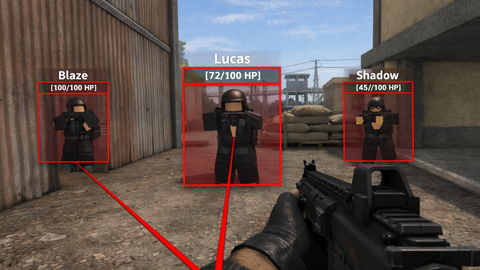
GUI-Based ESP for Roblox A lightweight, GUI-based ESP for Roblox that runs entirely on the client side. Designed to work with Client-Side Executors, this script does not rely on Drawing or Highlight instances, making it simple and efficient. Features Box ESP: Transparent fill with colored outline. Name Tags: Displays player names above the ESP box. Health Display: Shows current and maximum health under the name. Health Bar: Vertical bar on the left side of the box indicating health percentage. Snaplines: Lines from the bottom of the screen to the center of the ESP box. Distance Limiting: Only shows players within a configurable range. Configurable UI: Easily adjust colors, sizes, and refresh rate. Configuration You can customize the ESP by modifying the following variables in the script: ENABLED_BY_DEFAULT — Start with ESP enabled or disabled. MAX_DISTANCE — Maximum distance (in studs) for ESP to display. REFRESH_RATE — Refresh interval for updates. BOX_COLOR / BOX_FILL_COLOR — Outline and fill colors of the box. BOX_FILL_TRANSPARENCY — Transparency of the box fill. HEALTH_BAR_WIDTH / HEALTH_BAR_MARGIN — Health bar dimensions. SNAPLINE_THICKNESS — Thickness of the snapline. NAME_TEXT_SIZE — Size of the name text. TRACER_ORIGIN — Origin point for snaplines (Bottom recommended). Installation Inject the script into the desired game with a server or client sided executor. Execute it. Try not to be called a naive child. Compatibility Designed for client-side execution only. Tested with standard Roblox PlayerGui contexts. Does not require any third-party libraries. Usage Once running, the ESP automatically updates every frame (throttled by REFRESH_RATE) and displays boxes, names, health, and snaplines for all players within range. No manual activation is required. Disclaimer: This script is was made entirely by one person, please do not report me.


 Snowy Hub 80+ Games & 1600+ Features