1.6k Views
21 Executions
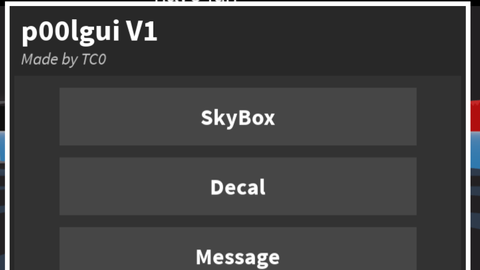
P00lgui v1 by TC0
Universal Script 📌
TC0LikesScriptsPublished 10
1 year ago
Please login to perform these actions:Does it work?
No reports yetNo reports yet. Tried it? Be the first to say.
Also noticed:
Description
V1
Updates
Script edited: Update script
local player = game.Players.LocalPlayer
local playerGui = player:WaitForChild("PlayerGui")

local screenGui = Instance.new("ScreenGui")
screenGui.Name = "p00lguiV1"
screenGui.Parent = playerGui

local whiteBorder = Instance.new("Frame")
whiteBorder.Name = "WhiteBorder"
whiteBorder.BackgroundColor3 = Color3.fromRGB(255, 255, 255)
whiteBorder.Size = UDim2.new(0, 400, 0, 560) -- más alto para el nuevo botón
whiteBorder.Position = UDim2.new(0.5, -200, 0.5, -280)
whiteBorder.BorderSizePixel = 0
whiteBorder.Active = true
whiteBorder.Draggable = true
whiteBorder.Parent = screenGui

local darkGrayBorder = Instance.new("Frame")
darkGrayBorder.Name = "DarkGrayBorder"
darkGrayBorder.BackgroundColor3 = Color3.fromRGB(40, 40, 40)
darkGrayBorder.Position = UDim2.new(0, 4, 0, 4)
darkGrayBorder.Size = UDim2.new(1, -8, 1, -8)
darkGrayBorder.BorderSizePixel = 0
darkGrayBorder.Parent = whiteBorder

local titleLabel = Instance.new("TextLabel")
titleLabel.Name = "TitleLabel"
titleLabel.Text = "p00lgui V1"
titleLabel.Font = Enum.Font.SourceSansBold
titleLabel.TextSize = 32
titleLabel.TextColor3 = Color3.fromRGB(255, 255, 255)
titleLabel.BackgroundTransparency = 1
titleLabel.Position = UDim2.new(0, 10, 0, 5)
titleLabel.Size = UDim2.new(1, -20, 0, 30)
titleLabel.TextXAlignment = Enum.TextXAlignment.Left
titleLabel.Parent = darkGrayBorder

local subTitleLabel = Instance.new("TextLabel")
subTitleLabel.Name = "SubTitleLabel"
subTitleLabel.Text = "Made by TC0"
Comments
0Log in to join the conversation. Login
No comments yet. Be the first!