12.4k Views
36 Executions
Monke UI Library
Universal Script 📌
ChronosFirst script
2 years ago
Please login to perform these actions:Does it work?
No reports yetNo reports yet. Tried it? Be the first to say.
Also noticed:
Description
NOT MINE!!!!! original : https://raw.githubusercontent.com/10x00/Tools/main/Super%20Hot%20Monke%20UI
    local UI = loadstring(game:HttpGet'https://raw.githubusercontent.com/10x00/Tools/main/Super%20Hot%20Monke%20UI')()

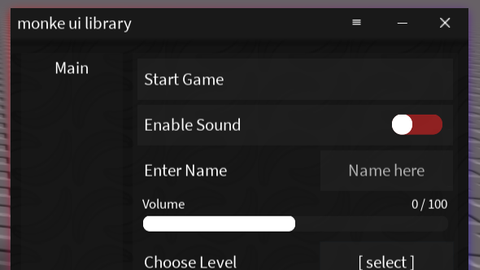
    UI.Title.Text = "monke ui library"

    UI.newTab("Main")

	UI.newButton(UI.Main, "Start Game", function()

	end);

	UI.newCheckBox(UI.Main, "Enable Sound", function(state)

	end);

	UI.newTextBox(UI.Main, "Enter Name", "Name here", function(text)

	end);

	UI.newSlider(UI.Main, "Volume", 0, 100, function(value)

	end);

	UI.newDropDown(UI.Main, "Choose Level", {"Level 1", "Level 2", "Level 3"}, function(selected)

	end);

	UI.newHeader(UI.Main, "Settings");
	UI.newLabel(UI.Main, "skibidi toilet");

-- You need to change the UI.Main to make it work like for example UI.newTab("Main") you see the Main and UI? put it together and then UI.Main!!!11



@ExploitFin It is I think is for PC only just hold the top of the UI Lib
Aw it isn't draggable