1.7k Views
543 Executions
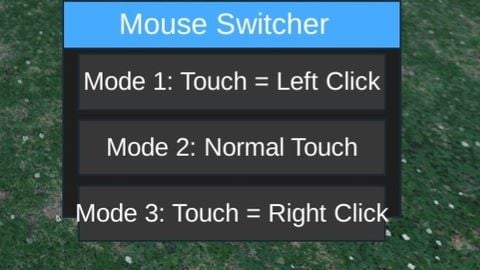
Mobile phone mouse
Universal Script 📌
ggggGTIffFirst script
7 months ago
Please login to perform these actions:Does it work?
No reports yetNo reports yet. Tried it? Be the first to say.
Also noticed:
Description
Some games or certain features of the game require a mouse to use. And I looked for a long time, but I didn't find anything including the right button. So I made this.
local UIS = game:GetService("UserInputService")
local CoreGui = game:GetService("CoreGui")

local currentMode = 2

local function LeftClick()
    if typeof(mouse1click) == "function" then
        mouse1click()
    end
end

local function RightClick()
    if typeof(mouse2click) == "function" then
        mouse2click()
    end
end

-- Draggable UI
local ScreenGui = Instance.new("ScreenGui")
ScreenGui.Parent = CoreGui
ScreenGui.Name = "SimpleMouse"
ScreenGui.ResetOnSpawn = false

local Main = Instance.new("Frame")
Main.Size = UDim2.new(0, 220, 0, 140)
Main.Position = UDim2.new(0.5, -110, 0.5, -70)
Main.BackgroundColor3 = Color3.fromRGB(30, 30, 30)
Main.Active = true
Main.Draggable = true
Main.Parent = ScreenGui

local TitleBar = Instance.new("Frame")
TitleBar.Size = UDim2.new(1, 0, 0, 30)
TitleBar.BackgroundColor3 = Color3.fromRGB(70, 170, 255)
TitleBar.Draggable = true
TitleBar.Parent = Main

local Title = Instance.new("TextLabel")
Title.Size = UDim2.new(1, -10, 1, 0)
Title.BackgroundTransparency = 1




how do you turn it off? I’m mobile and I can’t deactivate it so what do I do? I can’t move if I can’t use/see the movement thing or the jump button, please make it so I can turn it off bro
@Ryderjpruitt I can only do so much. You can try to drag it off the screen. If you have a problem with your backpack not being able to drag, you can try another script. A backpack made.
I've been trying to do this compatibility script. This is my second script.