2.2k Views
36 Executions
Mobile Support Drag UI
Universal Script 📌
lumpiasalladFirst script
2 years ago
Please login to perform these actions:Does it work?
No reports yetNo reports yet. Tried it? Be the first to say.
Also noticed:
Description
This is for developers only Those who need a script that helps Mobile support
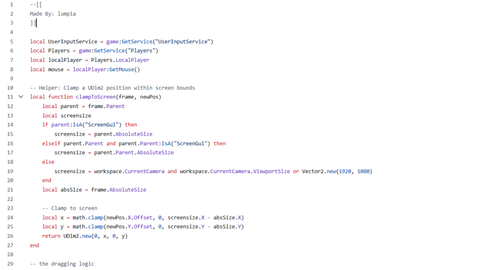
--[[
Made By: lumpia
]]

local UserInputService = game:GetService("UserInputService")
local Players = game:GetService("Players")
local localPlayer = Players.LocalPlayer
local mouse = localPlayer:GetMouse()

-- Helper: Clamp a UDim2 position within screen bounds
local function clampToScreen(frame, newPos)
    local parent = frame.Parent
    local screensize
    if parent:IsA("ScreenGui") then
        screensize = parent.AbsoluteSize
    elseif parent.Parent and parent.Parent:IsA("ScreenGui") then
        screensize = parent.Parent.AbsoluteSize
    else
        screensize = workspace.CurrentCamera and workspace.CurrentCamera.ViewportSize or Vector2.new(1920, 1080)
    end
    local absSize = frame.AbsoluteSize

    -- Clamp to screen
    local x = math.clamp(newPos.X.Offset, 0, screensize.X - absSize.X)
    local y = math.clamp(newPos.Y.Offset, 0, screensize.Y - absSize.Y)
    return UDim2.new(0, x, 0, y)
end

-- the dragging logic

local function dragToPosition(startInputPos, startFramePos, currInputPos, frame, bounds)
    local delta = currInputPos - startInputPos
    local newPos = UDim2.new(
        startFramePos.X.Scale,
        startFramePos.X.Offset + delta.X,
        startFramePos.Y.Scale,
        startFramePos.Y.Offset + delta.Y
    )
    if bounds then
        newPos = clampToScreen(frame, newPos)



here github link :https://github.com/lumpiasallad/MobileSuport_Drag_UI_Script-