29 Views
1 Executions
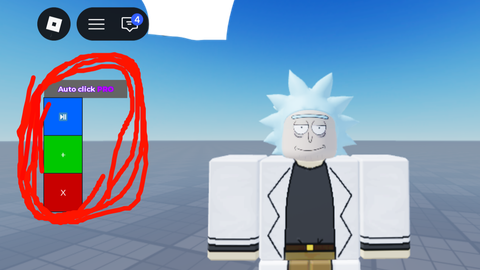
Mobile Autoclicker VibeCoded
Universal Script 📌
2 days ago · Updated
Reviewed by QueueSpeedDemonPaid revieweron How review works
Does it work?
No reports yetNo reports yet. Tried it? Be the first to say.
Also noticed:
Description
Autoclicker draggable and can change cps
local Players = game:GetService("Players")
local UIS = game:GetService("UserInputService")
local VIM = game:GetService("VirtualInputManager")

local OFFSET_X = 59
local OFFSET_Y = 37
local CPS = 10

local player = Players.LocalPlayer
local playerGui = player:WaitForChild("PlayerGui")

if playerGui:FindFirstChild("DraggableAutoClicker") then
	playerGui:FindFirstChild("DraggableAutoClicker"):Destroy()
end

local gui = Instance.new("ScreenGui")
gui.Name = "DraggableAutoClicker"
gui.ResetOnSpawn = false
gui.DisplayOrder = inf
gui.IgnoreGuiInset = true
gui.Parent = playerGui

-- Panel
local panel = Instance.new("Frame")
panel.Size = UDim2.new(0, 170, 0, 180)
panel.Position = UDim2.new(0.5, -85, 0.7, 0)
panel.BackgroundColor3 = Color3.fromRGB(30,30,30)
panel.Active = true
panel.Parent = gui
Instance.new("UICorner", panel)

local toggle = Instance.new("TextButton")
toggle.Size = UDim2.new(0.9, 0, 0, 35)
toggle.Position = UDim2.new(0.05, 0, 0.05, 0)
toggle.Text = "AutoClick: OFF"
toggle.BackgroundColor3 = Color3.fromRGB(220,60,60)
toggle.TextColor3 = Color3.new(1,1,1)
toggle.Font = Enum.Font.GothamBold
toggle.TextSize = 14
toggle.Parent = panel
Comments
0Log in to join the conversation. Login
No comments yet. Be the first!