LinoriaHeart V1

Reviewed by QueueSpeedDemonPaid revieweron How review works
Does it work?
No reports yetNo reports yet. Tried it? Be the first to say.
Description
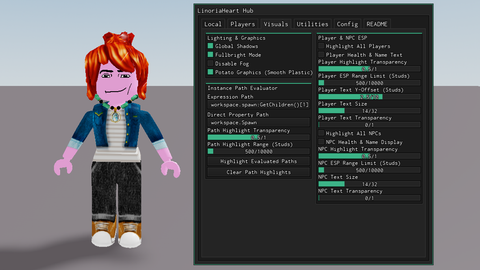
FluentHeart's older brother. [OPEN SOURCE] Movement WalkSpeed & JumpPower Sliders: Adjust character movement speed (16–250) and jump height (50–300). Instant Stop (Disable Sliding): Removes character deceleration so you stop moving immediately when keys are released. Custom Gravity & Slope Angle: Adjustable gravity control and 360° MaxSlopeAngle toggle to walk up vertical surfaces. No Void Protection: Lowers the void kill-boundary height so you don't die or get destroyed when falling off the map. Camera & FOV Controls: Field of view slider (60–120) and extended camera zoom distance slider (up to 12,800 studs). Float Platform: Spawns an anchored platform beneath your feet with customizable vertical offset and Q/E key controls for moving up and down. Waypoint System: Save up to 50 custom position waypoints, teleport to saved points, delete waypoints, or TP directly to any active game SpawnLocation. Position & Axis Tools: One-click copy for current CFrame coordinates to clipboard and snap character facing direction directly North. Teleport Tool: Equips a click-to-teleport tool in your inventory. Players & Tracking Player Teleport: Select any player from a dropdown list to instantly teleport to their location. Latch Onto Player: Teleports to a chosen player and automatically teleports you back to your starting position once turned off. Spectate Camera & Beam Tracer: Spectate target player viewports with a visual beam tracer drawing a line between your character and theirs. Low HP Tracker: Audio alerts and notifications when surrounding players drop below 35 HP. Death Logger & Teleport: Automatically logs player death coordinates (including void deaths) with timestamps and allows you to teleport to where they died. Visuals & Rendering Lighting Adjustments: Fullbright toggle, disable fog, and global shadow toggle. Potato Graphics: Converts world materials to Smooth Plastic for more FPS on lower-end devices. Player ESP: Wall-penetrating highlights and Billboard text displaying player names and real-time health (with range, font size, Y-offset, and transparency sliders). NPC ESP: Separate highlight and text display for non-player humanoids in workspace. Instance Path Evaluator: Evaluates string expressions or property paths (e.g., workspace.spawn:GetChildren()[1]) and highlights matched parts through walls. Utilities & Diagnostics Player Activity Logger: Tracks player leave events and session durations with queued notification popups. Integrated Script Launchers: One-click execution for UniversalSynSaveInstance and Infinite Yield. Workspace Scanner: Scans workspace to count anchored parts, unanchored parts, tools, players, and NPCs. Live Performance Tracker: Monitors real-time FPS, network latency (Ping in ms), and total Memory usage (MB). Customization & Configurations Custom UI Keybind: Remap the UI toggle key (default is Right Control). Sound Customization: Select sound IDs and adjust volumes for Low HP, Player Left, and General UI notifications. Linoria Config & Theme Manager: Save, load, and auto-load script profiles or customize UI theme colors. Telemetry & Usage Stats: Optional feature counter that logs script session metrics to the developer console (F9).
-- Credits to tennisballs9000 on discord, dm me for suggestions
-- ==========================================
-- 1. RE-EXECUTION, UNLOAD & OLD UI CLEANUP
-- ==========================================
local Lighting = game:GetService("Lighting")
local Players = game:GetService("Players")
local HttpService = game:GetService("HttpService")
local SoundService = game:GetService("SoundService")
local MarketplaceService = game:GetService("MarketplaceService")
local RunService = game:GetService("RunService")
local Workspace = game:GetService("Workspace")
local UserInputService = game:GetService("UserInputService")
local StatsService = game:GetService("Stats")

local LocalPlayer = Players.LocalPlayer
local Mouse = LocalPlayer:GetMouse()

-- Cache true original game settings on FIRST execution only
if _G.OriginalLighting == nil then
    _G.OriginalLighting = {
        Brightness = Lighting.Brightness,
        Ambient = Lighting.Ambient,
        GlobalShadows = Lighting.GlobalShadows,
        FogEnd = Lighting.FogEnd,
        FogStart = Lighting.FogStart,
    }
end
if _G.OriginalGravity == nil then _G.OriginalGravity = workspace.Gravity end
if _G.OriginalCameraMaxZoom == nil then _G.OriginalCameraMaxZoom = LocalPlayer.CameraMaxZoomDistance end
if _G.OriginalFallenPartsDestroyHeight == nil then _G.OriginalFallenPartsDestroyHeight = workspace.FallenPartsDestroyHeight end

local function getSafeGuiContainer()
    if typeof(gethui) == "function" then
        local success, result = pcall(gethui)
        if success and result then return result end
    end
    local success, coreGui = pcall(function() return game:GetService("CoreGui") end)
    if success and coreGui then return coreGui end
    return LocalPlayer:WaitForChild("PlayerGui")
end
credits to chatgpt