22 Views
2 Executions
LineDasher
Universal Script 📌
2 days ago · Updated
Reviewed by QueueSherlockPaid revieweron How review works
Does it work?
No reports yetNo reports yet. Tried it? Be the first to say.
Also noticed:
Description
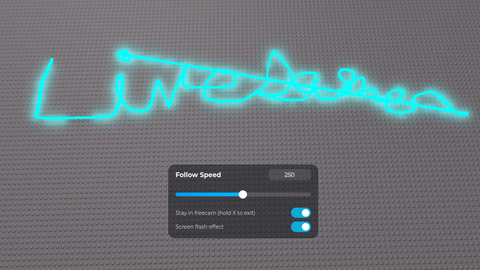
Hold Z to draw a line with your mouse Press X to enter freecam and draw a line using your mouse press P for gui Keybinds can be changed in the script
-- PathDash: hold Z to draw a path, release Z to rush along it.
-- You walk the path (with a walking animation) and your character is aligned
-- to whatever surface the path is on: floors, walls, ceilings.
-- Put this in a LocalScript inside StarterPlayer > StarterPlayerScripts.

local Players = game:GetService("Players")
local UserInputService = game:GetService("UserInputService")
local RunService = game:GetService("RunService")
local TweenService = game:GetService("TweenService")
local ReplicatedStorage = game:GetService("ReplicatedStorage")

local player = Players.LocalPlayer

--// SETTINGS
local KEY = Enum.KeyCode.Z
local DRAW_MODE = "Mouse"      -- "Mouse" = draw by moving your cursor over surfaces
                               -- "Walk"  = draw by walking around while holding Z
local FOLLOW_SPEED = 250       -- studs per second while following the path (default walk is 16)
local MIN_POINT_SPACING = .25  -- studs between recorded points
local MAX_POINTS = 1000        -- cap on path length
local SPEED_UI_KEY = Enum.KeyCode.P  -- toggles the speed slider
local SPEED_MIN = 1            -- lowest speed the slider / text box allows
local SPEED_SLIDER_MAX = 500   -- speed at the far right of the slider
local SPEED_MAX = 5000         -- highest speed you can type in
local FREECAM_KEY = Enum.KeyCode.X   -- enter freecam / press again to dash along the path
local FREECAM_SPEED = 80       -- freecam fly speed (studs/sec); scroll wheel changes it live
local FREECAM_BOOST = 3        -- speed multiplier while holding Shift
local FREECAM_START_DISTANCE = 60   -- how far above/behind you the camera swoops to
local FREECAM_START_PITCH = -55     -- degrees; negative looks down at your character
local FREECAM_TRANSITION = 0.9      -- seconds for the camera swoop in/out
local FREECAM_FOV_PUNCH = 18        -- extra field of view at the middle of the swoop
local FREECAM_LOOK_SENS = 0.003     -- mouse look sensitivity (hold right mouse)
local FREECAM_LOOK_SMOOTHING = 20   -- higher = snappier look
local FREECAM_MOVE_SMOOTHING = 8    -- higher = snappier acceleration
local STAY_IN_FREECAM = false       -- if true, you stay in freecam after dashing: tap X to dash,
                                    -- HOLD X to exit (can also be toggled live in the speed panel, press P)
local FREECAM_EXIT_HOLD = 0.5         -- seconds you hold X to exit freecam in that mode
local SCREEN_FLASH = true           -- white flash + blur + color pop when entering/leaving freecam.
                                    -- Turn OFF for photosensitivity (also a switch in the speed panel, press P)
local PATH_COLOR = Color3.fromRGB(0, 200, 255)
Comments
0Log in to join the conversation. Login
No comments yet. Be the first!