Library Ui Fully Fixed Free
Universal Script 📌
Does it work?
No reports yetNo reports yet. Tried it? Be the first to say.
Description
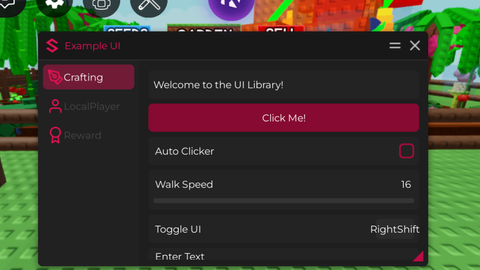
I Introduced And Post My New Update Free Ui Library This New My Old ui yesterday is lack of Features Now I Update Support some of needed. You can use rbxassetid here: https://github.com/frappedevs/lucideblox/blob/master/src/modules/util/icons.json Window Management -Draggable window with smooth animations - Resizable window with corner handle - Minimize to floating icon functionality - Close button with confirmation - Shadow effects for depth Tab System - Multi-tab support with icons - Two tab creation methods - window:Tab('Name', 'rbxassetid...' - window:Tab({"Name", "rbxassetid..."} Automatic text adjustment for long names - Smooth tab switching animations ~~UI Elements~~ -Button -Hover effects -Click animations -Mobile touch support ~~Toggle~~ -On/off state visualization - Smooth transition animations - Customizable default state ~~Label~~ - Static text display - Consistent styling ~~Slider~~ -Smooth dragging on PC and mobile - Real-time value display - Configurable min/max/default values - Precise value selection ~~Keybind~~ - Customizable key binding - Visual feedback when setting - Mobile-friendly input - Callback on key press ~~InputBox~~ - Text and number input support - Placeholder text - Enter key submission - Focus loss submission - Mobile keyboard support ~~Dropdown~~ - Single-select mode ~~Multi-DropDown~~ - Expandable/collapsible interface - Refresh functionality - Dynamic list updates - Selected item display - Mobile Support - Touch events for all elements - Draggable window on mobile - Responsive design - Touch-friendly button sizes - Virtual keyboard support - Visual Design - Modern dark theme ~~Rounded corners~~ - Smooth transitions - Hover states - Consistent spacing - Professional appearance ~~Minimize System~~ - Minimize button ~~Floating minimized icon~~ - Draggable minimized state - One-click restore - Persistent positioning - Dropdown-Specific Features - Multi-select with checkmarks - Selected item counter - Truncated display for many selections - Arrow rotation animation - Smooth expand/collapse - Refresh method for dynamic updates - Proper state management ~~Technical Features~~ - CoreGui integration - Executor compatibility - Performance optimized - Memory efficient - Error handling - Safe cleanup - Responsive feedback - Smooth animations - Clear visual hierarchy - Accessible design - Event-driven architecture - Callback system
Updates
Script edited: Update script
-- Load the UI library
local Library = loadstring(game:HttpGet('https://gist.githubusercontent.com/MjContiga1/5b9535166d60560ac884a871cb0dc418/raw/e7fdb16802d9486d8d04d3e41d3607d89e6b4a1b/Libsuck.lua'))()

-- Create main window
local window = Library:Window('Example UI')

-- Create tabs with icons replace ur own icon id
local mainTab = window:Tab({"Crafting", "rbxassetid://7734022041"})
local localTab = window:Tab({"LocalPlayer", "rbxassetid://7743875962"})
local settingsTab = window:Tab({"Reward", "rbxassetid://7733673987"})

-- Main Tab Elements
mainTab:Label("Welcome to the UI Library!")

-- Button
mainTab:Button('Click Me!', function()
    print("Button clicked!")
    game.StarterGui:SetCore("SendNotification", {
        Title = "Notification";
        Text = "Button was clicked!";
        Duration = 3;
    })
end)

-- Toggle
mainTab:Toggle('Auto Clicker', false, function(state)
    print("Auto Clicker is now:", state and "ON" or "OFF")
end)

-- Slider
mainTab:Slider("Walk Speed", 16, 100, 16, function(value)
    print("Walk Speed set to:", value)
    game.Players.LocalPlayer.Character.Humanoid.WalkSpeed = value
end)

-- Keybind
mainTab:Keybind("Toggle UI", Enum.KeyCode.RightShift, function(key)
    print("Key pressed:", key.Name)
end)

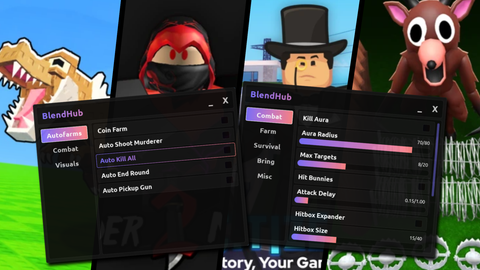

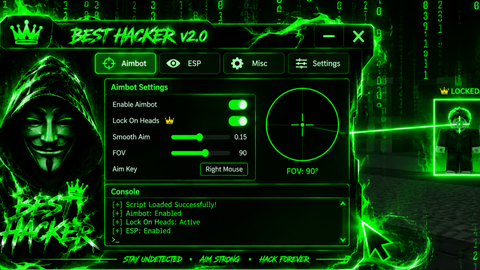



this is nice ui lib, undetected for the game im making it for 👍
how much detectable is this?
I update now minimize and exit still better rn