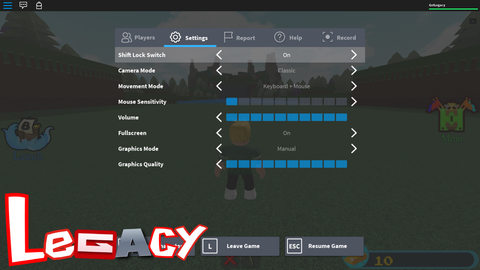
5.4k Views
23.9k Executions
Legacy Old Roblox UI Converter 2012 to 2016
10K executions
Universal Script 📌
Late10 followers
3 months ago
Please login to perform these actions:Does it work?
No reports yetNo reports yet. Tried it? Be the first to say.
Also noticed:
Description
For more information & previews read the GitHub: https://github.com/yeku/legacy (star it pls) This script is in beta, report bugs using GitHub for now To change the year go to the script and find "Year = 2016," and change it to "Year = 2012," (with the comma at the end) for example if you want to change it to 2012
getgenv().LegacySettings = ({
    Year = 2016, -- only 2012 to 2016 allowed (if unavailable, it will be set to 2016 by default)
    OldGraphics = true, -- changes graphics to be more like the 2016 graphics
    HideDisplayName = true, -- changes other users nametags to show their username instead of display name
    SafeChat = false, -- adds the safechat button, only works on 2012, 2013 and 2014
    OldConsole = false, -- adds the old developer console back
    OldBubbleChat = false, -- makes the bubble chat style like the 2016 one
})

loadstring(game:HttpGet("https://raw.githubusercontent.com/yeku/legacy/refs/heads/main/Source.luau"))()






Please remove this bug. I wanted to play the KAT game, but when I want to take a weapon from the inventory, I can't. I really like this script. Please refine it.
do 2020
Bro what's wrong with your github?
this is so good, thank you!
please add a 2010 ui and a 2011
little bit of a bug if you're playing mm2 or any game with chat disabled at first, when it brings back the chat window it'll show the current disgusting chat window eww gross
@Z3nie can you tell me what game the issue is on? tried every year's backpack system and it worked fine for me
@Late Blood Debt PVP, it uses the default backpack for equipping items and my settings for ur script were Year = 2016, -- only 2012 to 2016 allowed (if unavailable, it will be set to 2016 by default) OldGraphics = true, -- changes graphics to be more like the 2016 graphics HideDisplayName = true, -- changes other users nametags to show their username instead of display name SafeChat = false, -- adds the safechat button, only works on 2012, 2013 and 2014 OldConsole = false, -- adds the old developer console back OldBubbleChat = true,