15 Views
1 Executions
Lay ragdoll script keyless
Universal Script 📌
mrscallopyFirst script
3 days ago · Updated
Reviewed by QueueSherlockPaid revieweron How review works
Does it work?
No reports yetNo reports yet. Tried it? Be the first to say.
Also noticed:
Description
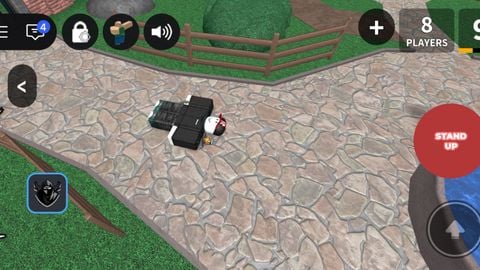
It's a lay down script specifically ragdoll down when you need it
-- Lay Down Ragdoll — LocalScript in StarterPlayer > StarterPlayerScripts
-- Full script. Works on mobile (published game). Client-side.

local Players = game:GetService("Players")
local player  = Players.LocalPlayer

------------------------------------------------------------
-- GUI (top-right, safe on mobile)
------------------------------------------------------------
local gui = Instance.new("ScreenGui")
gui.Name = "RagdollButton"
gui.ResetOnSpawn = false
gui.IgnoreGuiInset = true
gui.Parent = player:WaitForChild("PlayerGui")

local btn = Instance.new("TextButton")
btn.Size = UDim2.fromOffset(90, 90)
btn.Position = UDim2.new(1, -110, 0, 120)
btn.BackgroundColor3 = Color3.fromRGB(40, 45, 70)
btn.BorderSizePixel = 0
btn.Font = Enum.Font.GothamBlack
btn.TextSize = 12
btn.TextColor3 = Color3.new(1, 1, 1)
btn.Text = "LAY\nDOWN"
btn.AutoButtonColor = false
btn.Active = true
btn.Parent = gui
Instance.new("UICorner", btn).CornerRadius = UDim.new(0.5, 0)

local stroke = Instance.new("UIStroke", btn)
stroke.Color = Color3.fromRGB(90, 120, 255)
stroke.Thickness = 1.5

------------------------------------------------------------
-- STATE
------------------------------------------------------------
local isRagdolled = false

------------------------------------------------------------
-- RAGDOLL ON
Comments
0Log in to join the conversation. Login
No comments yet. Be the first!