137 Views
409 Executions
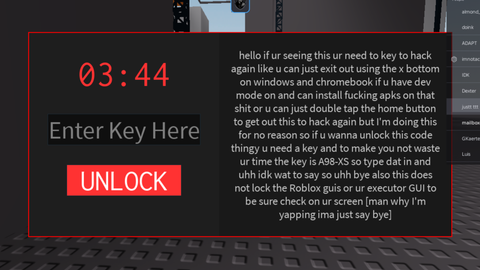
the local locker
Universal Script 📌
1TB_First script
4 months ago
Please login to perform these actions:Does it work?
No reports yetNo reports yet. Tried it? Be the first to say.
Also noticed:
Description
it just locks u cant move it if the timer runs out it justs stays look man I'm not gonna do more work for this stupid kick thingy also now this is luau
Updates
Script edited: Update script
--[[
	WARNING: Heads up! This script has not been verified by ScriptBlox. Use at your own risk!
]]
-- L0cker GUI Script
local Players = game:GetService("Players")
local CoreGui = game:GetService("CoreGui")

-- Determine where to put the GUI (CoreGui is best for executors, fallback to PlayerGui)
local parentGui = pcall(function() return CoreGui.Name end) and CoreGui or Players.LocalPlayer:WaitForChild("PlayerGui")

-- Create the main ScreenGui
local l0cker = Instance.new("ScreenGui")
l0cker.Name = "L0cker"
l0cker.IgnoreGuiInset = true
l0cker.ResetOnSpawn = false
l0cker.Parent = parentGui

-- Main background frame
local mainFrame = Instance.new("Frame")
mainFrame.Size = UDim2.new(0.7, 0, 0.6, 0)
mainFrame.Position = UDim2.new(0.15, 0, 0.2, 0)
mainFrame.BackgroundColor3 = Color3.fromRGB(20, 20, 20)
mainFrame.BorderSizePixel = 2
mainFrame.BorderColor3 = Color3.fromRGB(255, 0, 0)
mainFrame.Parent = l0cker

-- LEFT SIDE (Timer & Input)
local leftSide = Instance.new("Frame")
leftSide.Size = UDim2.new(0.45, 0, 1, 0)
leftSide.Position = UDim2.new(0, 0, 0, 0)
leftSide.BackgroundColor3 = Color3.fromRGB(30, 30, 30)
leftSide.BorderSizePixel = 0
leftSide.Parent = mainFrame

local timerLabel = Instance.new("TextLabel")
timerLabel.Size = UDim2.new(0.8, 0, 0.2, 0)
timerLabel.Position = UDim2.new(0.1, 0, 0.1, 0)
timerLabel.BackgroundTransparency = 1
timerLabel.Text = "05:00"
timerLabel.TextColor3 = Color3.fromRGB(255, 50, 50)
Comments
0Log in to join the conversation. Login
No comments yet. Be the first!