10.4k Views
130 Executions
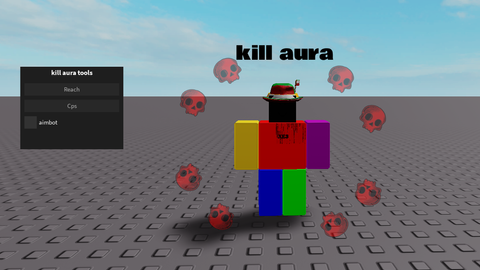
Kill Aura for tools
Universal Script 📌
XE3_Published 10
2 years ago
Please login to perform these actions:Does it work?
No reports yetNo reports yet. Tried it? Be the first to say.
Also noticed:
Description
--Reach for tools --Clicking cps while using tool --Aimbot
local player = game.Players.LocalPlayer
local mouse = player:GetMouse()
local uis = game:GetService("UserInputService")

local screenGui = Instance.new("ScreenGui", player:WaitForChild("PlayerGui"))
screenGui.ResetOnSpawn = false

local frame = Instance.new("Frame", screenGui)
frame.Size = UDim2.new(0, 250, 0, 200)
frame.Position = UDim2.new(0.1, 0, 0.1, 0)
frame.BackgroundColor3 = Color3.fromRGB(30, 30, 30)
frame.BorderSizePixel = 0
frame.Active = true
frame.Draggable = true
frame.Name = "KillAuraFrame"

local title = Instance.new("TextLabel", frame)
title.Text = "kill aura tools"
title.Size = UDim2.new(1, 0, 0, 30)
title.BackgroundTransparency = 1
title.TextColor3 = Color3.fromRGB(255, 255, 255)
title.Font = Enum.Font.SourceSansBold
title.TextSize = 20

local reachBox = Instance.new("TextBox", frame)
reachBox.PlaceholderText = "Reach"
reachBox.Size = UDim2.new(1, -20, 0, 30)
reachBox.Position = UDim2.new(0, 10, 0, 40)
reachBox.BackgroundColor3 = Color3.fromRGB(40, 40, 40)
reachBox.TextColor3 = Color3.fromRGB(255, 255, 255)
reachBox.BorderSizePixel = 0
reachBox.Font = Enum.Font.SourceSans
reachBox.TextSize = 18
reachBox.Text = ""
reachBox.ClearTextOnFocus = false

local cpsBox = Instance.new("TextBox", frame)
cpsBox.PlaceholderText = "Cps"
cpsBox.Size = UDim2.new(1, -20, 0, 30)
cpsBox.Position = UDim2.new(0, 10, 0, 80)



doesnt work pretty sure
hmmmmmmmmm I see
@SirPwnsAlot "Reach" set number you want to make your tool be able to work on reach you want, "Cps" click per second on tool you want to use
what is the Cps for?
What am I supposed to type in the two textboxes?