6.8k Views
350 Executions
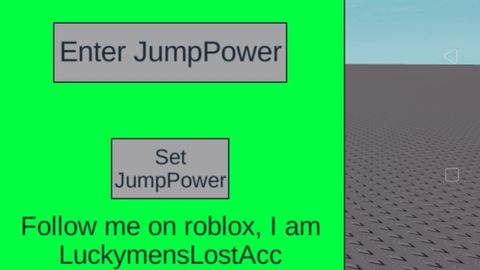
Jumppower changer gui script
Universal Script 📌
ProjectLolPublished 10
2 years ago
Please login to perform these actions:Does it work?
No reports yetNo reports yet. Tried it? Be the first to say.
Also noticed:
Description
It changes your jump power whatever you want Credits to: LuckymensLostAcc Works on: delta executor Enjoy:3
-- Create the ScreenGui
local screenGui = Instance.new("ScreenGui")
screenGui.Parent = game.Players.LocalPlayer:WaitForChild("PlayerGui")
screenGui.Name = "JumpPowerGui"

-- Create the Frame
local frame = Instance.new("Frame")
frame.Parent = screenGui
frame.BackgroundColor3 = Color3.new(1, 1, 1)
frame.Size = UDim2.new(0, 300, 0, 250) -- Increased height to accommodate the label
frame.Position = UDim2.new(0.5, -150, 0.5, -125)
frame.Active = true -- Make frame draggable

-- Enable dragging of the Frame
local UIS = game:GetService("UserInputService")
local dragging
local dragInput
local dragStart
local startPos

local function update(input)
    local delta = input.Position - dragStart
    frame.Position = UDim2.new(startPos.X.Scale, startPos.X.Offset + delta.X, startPos.Y.Scale, startPos.Y.Offset + delta.Y)
end

frame.InputBegan:Connect(function(input)
    if input.UserInputType == Enum.UserInputType.MouseButton1 or input.UserInputType == Enum.UserInputType.Touch then
        dragging = true
        dragStart = input.Position
        startPos = frame.Position

        input.Changed:Connect(function()
            if input.UserInputState == Enum.UserInputState.End then
                dragging = false
            end
        end)
    end
end)

frame.InputChanged:Connect(function(input)
Comments
0Log in to join the conversation. Login
No comments yet. Be the first!