1.5k Views
71 Executions
JoeyGUI Character Mesh Remover FE by joey9876a
Universal Script 📌
1 year ago
Please login to perform these actions:Does it work?
No reports yetNo reports yet. Tried it? Be the first to say.
Also noticed:
Description
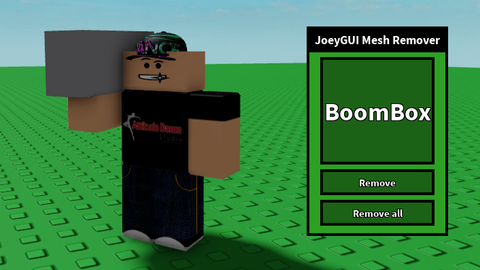
Lets you remove the mesh of your Tool, Accessory and Head by giving the name of the item. Meant to remove meshes from your character and not from the game itself. This script might not work on games with rejectcharacterdeletions enabled...
local plrs = game:GetService("Players")
local plr = plrs.LocalPlayer
local GuiParent = plr.PlayerGui

local gui = Instance.new("ScreenGui")
gui.Parent = GuiParent
gui.ResetOnSpawn = false

local Holder = Instance.new("Frame")
Holder.Parent = gui
Holder.Position = UDim2.new(0.5,0,0.5,0)
Holder.Size = UDim2.new(0,200,0,300)
Holder.BackgroundColor3 = Color3.fromRGB(46,160,36)
Holder.BorderColor3 = Color3.fromRGB(0,0,0)
Holder.BorderSizePixel = 4
Holder.AnchorPoint = Vector2.new(0.5,0.5)
Holder.Active = true
Holder.Draggable = true

local Text = Instance.new("TextLabel")
Text.Parent = Holder
Text.Text = "JoeyGUI Mesh Remover"
Text.TextSize = 22
Text.TextStrokeTransparency = 0
Text.TextColor3 = Color3.fromRGB(255,255,255)
Text.Font = Enum.Font.SourceSansBold
Text.Position = UDim2.new(0,0,0,0)
Text.Size = UDim2.new(1,0,0.1,0)
Text.BackgroundColor3 = Color3.fromRGB(0,0,0)
Text.BorderColor3 = Color3.fromRGB(0,0,0)
Text.BorderSizePixel = 4
Text.Active = false

local Input = Instance.new("TextBox")
Input.Parent = Holder
Input.TextScaled = true
Input.TextStrokeTransparency = 0
Input.TextColor3 = Color3.fromRGB(255,255,255)
Input.Font = Enum.Font.SourceSansBold
Input.PlaceholderText = "Name of desired object/tool to remove mesh"




what if some names are very hard to type
not fe bro i can already see