INSTANT CLICK BUTTON TOGGLING
Universal Script 📌
Does it work?
No reports yetNo reports yet. Tried it? Be the first to say.
Description
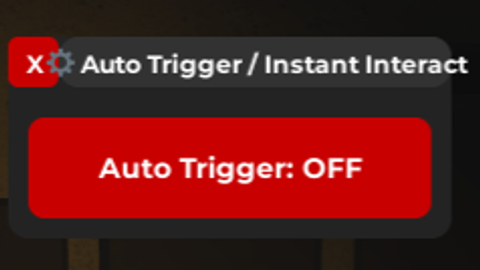
NEW SCRIPT! ARGH!. Hello :_) This is a new script from me. I had create another script where when you click the action button it will become instant. But now? A combination for automation trigger which you can toggle between off and on! Cool right? Okay quite honest, it was unstable. THING YOU NEED TO KNOW THAT ⚠️ - You must let the game/experience fully loaded before you execute this script. Or either way it will not work or not fully injected. - Not all game work. Kay? Sorry try my best actually. - Lagging after execution is normal, it will run as usual afterward. Special thanks with Copilot API helping me to reach this idea and make it into something that functional. AND YES THIS IS UNSTABLE!
Updates
Script edited: -- NEW VERSION + GUI
-- LocalScript inside StarterPlayerScripts
local player = game.Players.LocalPlayer
local uis = game:GetService("UserInputService")

-- GUI
local gui = Instance.new("ScreenGui", player:WaitForChild("PlayerGui"))
gui.Name = "AutoTriggerGui"
gui.ResetOnSpawn = false

-- Main Frame
local frame = Instance.new("Frame", gui)
frame.Size = UDim2.new(0, 220, 0, 100)
frame.Position = UDim2.new(0, 20, 0, 20)
frame.BackgroundColor3 = Color3.fromRGB(35, 35, 35)
frame.BorderSizePixel = 0
Instance.new("UICorner", frame).CornerRadius = UDim.new(0, 10)

-- Close Button (X)
local closeBtn = Instance.new("TextButton", frame)
closeBtn.Size = UDim2.new(0, 25, 0, 25)
closeBtn.Position = UDim2.new(0, 0, 0, 0)
closeBtn.BackgroundColor3 = Color3.fromRGB(200, 0, 0)
closeBtn.Text = "X"
closeBtn.TextColor3 = Color3.fromRGB(255, 255, 255)
closeBtn.Font = Enum.Font.GothamBold
closeBtn.TextSize = 14
Instance.new("UICorner", closeBtn).CornerRadius = UDim.new(0, 5)

closeBtn.MouseButton1Click:Connect(function()
    gui:Destroy()
end)

-- Title Bar (drag handle)
local titleBar = Instance.new("TextLabel", frame)
titleBar.Size = UDim2.new(1, -25, 0, 25) -- leave space for X button
titleBar.Position = UDim2.new(0, 25, 0, 0)
titleBar.BackgroundColor3 = Color3.fromRGB(50, 50, 50)
titleBar.Text = "⚙ Auto Trigger / Instant Interact"
titleBar.TextColor3 = Color3.fromRGB(255, 255, 255)
titleBar.Font = Enum.Font.GothamBold