Info Label
Universal Script 📌
Does it work?
No reports yetNo reports yet. Tried it? Be the first to say.
Description
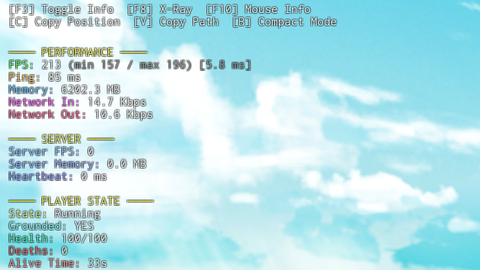
Core HUD Features Geometry Dash–style on-screen debug HUD Toggleable visibility (F3) Compact mode and full mode switch RichText formatting with section headers Monospaced font optimized for readability Non-resetting GUI (persists on respawn) Performance Monitoring Real-time FPS counter Average frame time (ms) FPS minimum and maximum tracking (last interval) Client memory usage (MB) Network incoming bandwidth (Kbps) Network outgoing bandwidth (Kbps) Session uptime tracking Server Diagnostics Estimated server FPS Server memory usage Server heartbeat time (ms) Player count and max players Player State & Gameplay Humanoid state detection (Running, Jumping, Falling, etc.) Grounded state detection (Humanoid state + raycast fallback) Current health and max health Death counter Alive time since last respawn WalkSpeed and JumpPower display Movement & Physics Real horizontal velocity using AssemblyLinearVelocity Smoothed velocity calculation via rolling average Exact world position (X, Y, Z) Gravity value from Workspace Input Monitoring Real-time movement key detection W, A, S, D Space Shift Control Clean input display (movement-only focus) Multiplayer Awareness Nearest player detection Distance to nearest player (studs) Directional indicator (N, NE, E, etc.) Real-time updates while players move Mouse & World Inspection Toggleable mouse inspection mode (F10) Mouse target detection Target name, class, material Target size and world position Full instance path display Separate mouse info panel Highlight applied to hovered parts Beam rendered from player to mouse target X-Ray Mode Toggleable X-Ray mode (F8) Highlight rendering on all other players World geometry transparency override Original transparency preservation and restoration Automatic handling for players joining mid-session Utility Tools Copy player position to clipboard (C) Copy mouse target instance path to clipboard (V) On-screen copy confirmation notification Executor-compatible clipboard handling System & Device Info Platform detection (PC, Console, Mobile) Graphics quality level Screen resolution detection Camera Field of View (FOV) Time of day from Lighting Game & Account Info Place ID display Job ID display User ID display Account age in days Stability & Safety Extensive use of protected calls (pcall) Graceful handling of missing characters or components Automatic cleanup of temporary instances Safe toggling of all optional systems Input Controls Summary F3: Toggle HUD visibility F8: Toggle X-Ray mode F10: Toggle mouse inspection B: Toggle compact mode C: Copy player position V: Copy mouse target path Credits to whom they are due






useful script
for your own fps, just press shift+f5 on roblox.
@PomPomSaturin 9th mod av seen yippe
If only it had mobile support, also uuhhh should i be concerned that its obfuscated?