20 Views
4 Executions
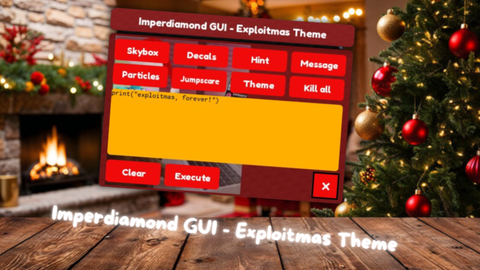
Imperdiamond GUI - Christmas Theme
Universal Script 📌
7 hours ago
Reviewed by QueueMatttsPaid revieweron How review works
Does it work?
No reports yetNo reports yet. Tried it? Be the first to say.
Also noticed:
Description
Supported with every executors! I unrecommend to use this script with jjSploit.
-- Imperdiamond GUI - Exploitmas Theme (con UI Shadow sfocata)
local Players = game:GetService("Players")
local CoreGui = game:GetService("CoreGui")
local Lighting = game:GetService("Lighting")
local SoundService = game:GetService("SoundService")

local MAIN_DECAL = "rbxassetid://106097592071183"
local PARTICLE_DECAL = "rbxassetid://94994722704316"
local THEME_AUDIO = "rbxassetid://109288862252885"
local JUMPSCARE_AUDIO = "rbxassetid://6129291390"
local SHADOW_TEXTURE = "rbxassetid://1316045217"

if CoreGui:FindFirstChild("ImperdiamondGUI") then
    CoreGui.ImperdiamondGUI:Destroy()
end

local ScreenGui = Instance.new("ScreenGui")
ScreenGui.Name = "ImperdiamondGUI"
ScreenGui.ResetOnSpawn = false
pcall(function() if syn and syn.protect_gui then syn.protect_gui(ScreenGui) end end)
ScreenGui.Parent = CoreGui

local MainContainer = Instance.new("Frame")
MainContainer.Name = "MainContainer"
MainContainer.Size = UDim2.new(0, 460, 0, 340)
MainContainer.Position = UDim2.new(0.5, -230, 0.5, -170)
MainContainer.BackgroundTransparency = 1
MainContainer.Active = true
MainContainer.Draggable = true
MainContainer.Parent = ScreenGui

-- Funzione per creare l'ombra sfocata morbida (9-Slice)
local function AddSoftShadow(parent, blurSpread, transparency)
    local shadow = Instance.new("ImageLabel")
    shadow.Name = "SoftShadow"
    shadow.BackgroundTransparency = 1
    shadow.AnchorPoint = Vector2.new(0.5, 0.5)
    shadow.Position = UDim2.new(0.5, 0, 0.5, 4)
    shadow.Size = UDim2.new(1, blurSpread, 1, blurSpread)
    shadow.ZIndex = parent.ZIndex - 1
Comments
0Log in to join the conversation. Login
No comments yet. Be the first!