19.7k Views
38 Executions
Humanoid Position Finder
Universal Script 📌
syntPublished 5
1 year ago
Please login to perform these actions:Does it work?
No reports yetNo reports yet. Tried it? Be the first to say.
Also noticed:
Description
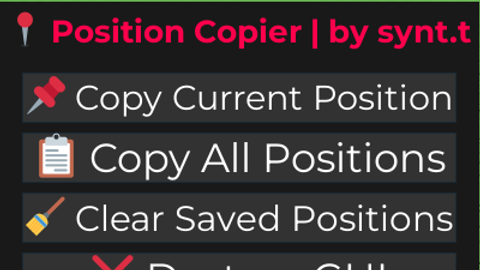
Simple Humanoid Position Finder
Updates
Script edited: Update script
--[[
    📍 Position Copy GUI
    Made by synt.t
--]]

local plr = game:GetService("Players").LocalPlayer
local savedPositions = {}

-- GUI
local gui = Instance.new("ScreenGui", game.CoreGui)
gui.Name = "PositionCopier"

local frame = Instance.new("Frame", gui)
frame.Size = UDim2.new(0, 400, 0, 250)
frame.Position = UDim2.new(0.5, -200, 0.5, -125)
frame.BackgroundColor3 = Color3.fromRGB(25, 25, 25)
frame.BorderSizePixel = 0
frame.Active = true
frame.Draggable = true

local title = Instance.new("TextLabel", frame)
title.Size = UDim2.new(1, 0, 0, 50)
title.BackgroundTransparency = 1
title.Text = "📍 Position Copier | by synt.t"
title.TextScaled = true
title.Font = Enum.Font.GothamBold
title.TextColor3 = Color3.fromRGB(255, 255, 255)

-- Rainbow title animation
task.spawn(function()
	while true do
		for i = 0, 1, 0.01 do
			title.TextColor3 = Color3.fromHSV(i, 1, 1)
			task.wait(0.02)
		end
	end
end)

-- Button creator
local function createBtn(text, posY, callback)






It does, first you press copy current position then you press copy all positions to copy it.
look at my most recent loll
@synt Not Working I've tried clicking the button and nothing happens
Okay? You dont have to code yourself if you wanna post on the forum. I'm just helping exploiters out.
you skids and AI generators are not welcome here.
least obvious AI script: