774 Views
743 Executions
Humachar Humanoid Character Changer Tool
Universal Script 📌
9 months ago
Please login to perform these actions:Does it work?
No reports yetNo reports yet. Tried it? Be the first to say.
Also noticed:
Description
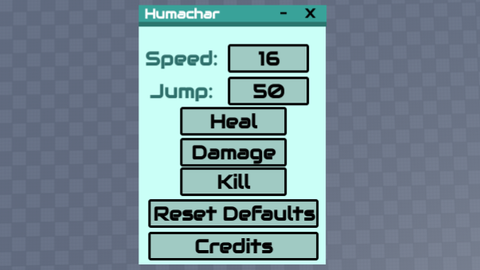
Humachar - Humanoid Character Changer Tool ------------------------------------------------- What does it have? Speed changer; Jump changer; Heal Health; Damage -25 Health; Kill Player; Reset Defaults Button; Credits Button; SMOOTH UI, MINIMIZABLE, MAXIMIZABLE, AND CLOSEABLE! For everyone, and for any game. (Made in Studio, GUI2LUA Used!)
--GUI 2 LUA was used!! Thanks for using my Humachar script :3
local G2L = {};

-- StarterGui.HumacharUI
G2L["1"] = Instance.new("ScreenGui", game:GetService("Players").LocalPlayer:WaitForChild("PlayerGui"));
G2L["1"]["Name"] = [[HumacharUI]];
G2L["1"]["ZIndexBehavior"] = Enum.ZIndexBehavior.Sibling;


-- StarterGui.HumacharUI.Topbar
G2L["2"] = Instance.new("Frame", G2L["1"]);
G2L["2"]["BorderSizePixel"] = 0;
G2L["2"]["BackgroundColor3"] = Color3.fromRGB(58, 163, 154);
G2L["2"]["Size"] = UDim2.new(0, 236, 0, 22);
G2L["2"]["Position"] = UDim2.new(0.43548, -85, 0.26734, -38);
G2L["2"]["BorderColor3"] = Color3.fromRGB(0, 0, 0);
G2L["2"]["Name"] = [[Topbar]];


-- StarterGui.HumacharUI.Topbar.TopbarShadow
G2L["3"] = Instance.new("Frame", G2L["2"]);
G2L["3"]["BorderSizePixel"] = 0;
G2L["3"]["BackgroundColor3"] = Color3.fromRGB(43, 119, 111);
G2L["3"]["Size"] = UDim2.new(0, 236, 0, 6);
G2L["3"]["Position"] = UDim2.new(-0.00028, 0, 0.97432, 0);
G2L["3"]["BorderColor3"] = Color3.fromRGB(0, 0, 0);
G2L["3"]["Name"] = [[TopbarShadow]];


-- StarterGui.HumacharUI.Topbar.HTitle
G2L["4"] = Instance.new("TextLabel", G2L["2"]);
G2L["4"]["TextWrapped"] = true;
G2L["4"]["BorderSizePixel"] = 0;
G2L["4"]["TextSize"] = 14;
G2L["4"]["TextScaled"] = true;
G2L["4"]["BackgroundColor3"] = Color3.fromRGB(255, 255, 255);
G2L["4"]["FontFace"] = Font.new([[rbxassetid://12187360881]], Enum.FontWeight.Bold, Enum.FontStyle.Normal);
G2L["4"]["TextColor3"] = Color3.fromRGB(255, 255, 255);
G2L["4"]["BackgroundTransparency"] = 1;
G2L["4"]["Size"] = UDim2.new(0, 108, 0, 21);





What does "damage" mean? is that the damage you do to others or yourself?
@Lawriesurge It takes 25 Damage away from your player health
Finally what i needed thanks bro a lot it works Nice script! Also could you add health changer too though
@antierror32 yea yea np. I'll add that. Also, thanks for the support :D
@ChaseyScriptzy np!
NO AI USED!!