877 Views
355 Executions
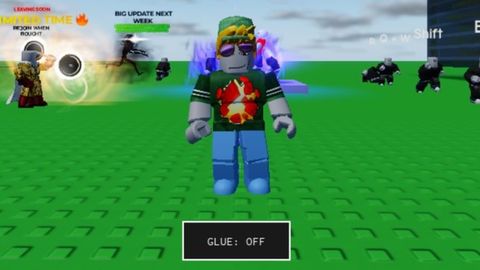
Glue Script
Universal Script 📌
srisoegihartoFirst script
9 months ago
Please login to perform these actions:Does it work?
No reports yetNo reports yet. Tried it? Be the first to say.
Also noticed:
Description
IT sticks to anything (on the ground), also u can change the value on the script on the first value an the top
local UIS = game:GetService("UserInputService")
local lp = game.Players.LocalPlayer

local glue = PhysicalProperties.new(100, 0.5, 1, 100, 100)
local normal = PhysicalProperties.new(0.7, 0.3, 0.5, 1, 1)

local gui = Instance.new("ScreenGui", lp.PlayerGui)
gui.Name = "GlueTool"
gui.ResetOnSpawn = false

local frame = Instance.new("Frame", gui)
frame.Size = UDim2.new(0, 130, 0, 45)
frame.Position = UDim2.new(0.5, -65, 0.8, 0)
frame.BackgroundColor3 = Color3.fromRGB(25, 25, 25)
frame.BorderSizePixel = 2
frame.BorderColor3 = Color3.new(1, 1, 1)

local btn = Instance.new("TextButton", frame)
btn.Size = UDim2.new(1, 0, 1, 0)
btn.BackgroundTransparency = 1
btn.Text = "GLUE: OFF"
btn.TextColor3 = Color3.new(1, 1, 1)
btn.Font = "Code"
btn.TextSize = 15

local drag = false
local startPos, dragStart

btn.InputBegan:Connect(function(input)
	if input.UserInputType == Enum.UserInputType.MouseButton1 or input.UserInputType == Enum.UserInputType.Touch then
		drag = true
		dragStart = input.Position
		startPos = frame.Position
	end
end)

UIS.InputChanged:Connect(function(input)
	if drag and (input.UserInputType == Enum.UserInputType.MouseMovement or input.UserInputType == Enum.UserInputType.Touch) then
		local delta = input.Position - dragStart
		frame.Position = UDim2.new(startPos.X.Scale, startPos.X.Offset + delta.X, startPos.Y.Scale, startPos.Y.Offset + delta.Y)







i made another script ;)