
835 Views
211 Executions
Global Hub
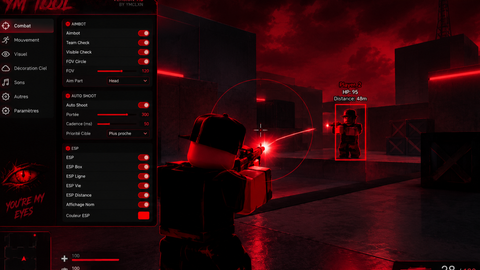
Universal Script 📌
TestGamerForYTrobloxPublished 5
1 year ago
Please login to perform these actions:Does it work?
No reports yetNo reports yet. Tried it? Be the first to say.
Also noticed:
Description
Ainda vai lança a versao de Admin Panel
--[=[
 d888b  db    db d888888b      .d888b.      db      db    db  .d8b.
88' Y8b 88    88   `88'        VP  `8D      88      88    88 d8' `8b
88      88    88    88            odD'      88      88    88 88ooo88
88  ooo 88    88    88          .88'        88      88    88 88~~~88
88. ~8~ 88b  d88   .88.        j88.         88booo. 88b  d88 88   88    @uniquadev
 Y888P  ~Y8888P' Y888888P      888888D      Y88888P ~Y8888P' YP   YP  CONVERTER
]=]

-- Instances: 24 | Scripts: 8 | Modules: 0 | Tags: 0
local G2L = {};

-- StarterGui.ScreenGui
G2L["1"] = Instance.new("ScreenGui", game:GetService("Players").LocalPlayer:WaitForChild("PlayerGui"));
G2L["1"]["ZIndexBehavior"] = Enum.ZIndexBehavior.Sibling;


-- StarterGui.ScreenGui.Frame
G2L["2"] = Instance.new("Frame", G2L["1"]);
G2L["2"]["BorderSizePixel"] = 0;
G2L["2"]["BackgroundColor3"] = Color3.fromRGB(113, 113, 113);
G2L["2"]["Size"] = UDim2.new(0, 299, 0, 247);
G2L["2"]["Position"] = UDim2.new(0.31932, 0, 0.06839, 0);
G2L["2"]["BorderColor3"] = Color3.fromRGB(0, 0, 0);


-- StarterGui.ScreenGui.Frame.TextLabel
G2L["3"] = Instance.new("TextLabel", G2L["2"]);
G2L["3"]["TextWrapped"] = true;
G2L["3"]["BorderSizePixel"] = 0;
G2L["3"]["TextSize"] = 14;
G2L["3"]["TextScaled"] = true;
G2L["3"]["BackgroundColor3"] = Color3.fromRGB(86, 171, 255);
G2L["3"]["FontFace"] = Font.new([[rbxasset://fonts/families/Bangers.json]], Enum.FontWeight.Bold, Enum.FontStyle.Normal);
G2L["3"]["TextColor3"] = Color3.fromRGB(0, 0, 0);
G2L["3"]["Size"] = UDim2.new(0, 248, 0, 50);
G2L["3"]["BorderColor3"] = Color3.fromRGB(0, 0, 0);
G2L["3"]["Text"] = [[Global Panel Admin]];
G2L["3"]["Position"] = UDim2.new(0.17057, 0, 0, 0);



AVISO NAO E FEITO OCM IA
yeah ts was made by ai
Ai