
Does it work?
Early reports100% say it works · 1 report in the last 2 weeks
Description
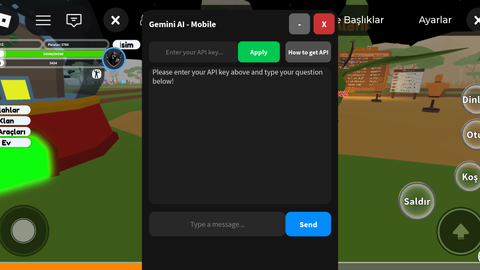
Gemini AI 3.5 Flash Introductory Loading Screen: Displays a prominent startup screen requesting support and credit for the developer (halilibrahimseviml1). Users must click the "Continue" button to access the main panel. Full Window Controls: Features an X button on the title bar to completely close the interface, alongside - / + buttons to smoothly minimize or restore the window using tween animations. Draggable Interface: Built-in dragging functionality allows users on mobile or desktop to freely move the panel anywhere across the screen. Built-in API Key Management: Includes a TextBox where users can input their own Gemini API key. An Apply button saves and confirms the entered key with a status message. A How to get API button provides step-by-step instructions on how to obtain a free API key from Google AI Studio. Smart Messaging & Cooldown System: Sends requests to the AI either by clicking the Send button or pressing Enter. Features a 2-second automatic cooldown to prevent spam requests and mitigate Rate Limit (Error 429) issues. Flexible Output Window: Utilizes a scrollable (ScrollingFrame) area to ensure long AI responses and code blocks remain fully readable.



yooo twin W script
Hello. I strongly suggest you rotate that API key now that everyone can see it, someone can easily copy the key and abuse tf out of it.
@PomPomSaturin thanks for the warning
eror 401
@Iias82 fixed
Uhh does it like connect to the roblox executor that it can tell the ai create me an script esp or somethink then it autonatically executes
@EASYFN_REAL no it does not automatically execute like that the script allows you to chat with the ai and generate code through the gemini api but you have to copy the generated code and paste it into the executor yourself