630 Views
10 Executions
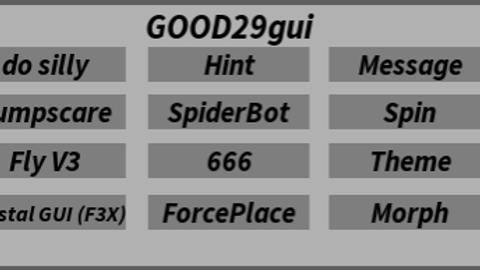
GOOD29gui v1
Universal Script 📌
CK5c00lkiddPublished 10
1 year ago
Please login to perform these actions:Does it work?
No reports yetNo reports yet. Tried it? Be the first to say.
Also noticed:
Description
r4r43r43r
-- no skid plz
local ScreenGui = Instance.new("ScreenGui")
local Frame = Instance.new("Frame")
local TextLabel = Instance.new("TextLabel")
local TextButton = Instance.new("TextButton")
local TextButton_2 = Instance.new("TextButton")
local TextButton_3 = Instance.new("TextButton")
local TextButton_4 = Instance.new("TextButton")
local TextButton_5 = Instance.new("TextButton")
local TextButton_6 = Instance.new("TextButton")
local TextButton_7 = Instance.new("TextButton")
local TextButton_8 = Instance.new("TextButton")
local TextButton_9 = Instance.new("TextButton")
local TextButton_10 = Instance.new("TextButton")
local TextButton_11 = Instance.new("TextButton")
local TextButton_12 = Instance.new("TextButton")

--Properties:

ScreenGui.Parent = game.Players.LocalPlayer:WaitForChild("PlayerGui")
ScreenGui.ZIndexBehavior = Enum.ZIndexBehavior.Sibling

Frame.Parent = ScreenGui
Frame.BackgroundColor3 = Color3.fromRGB(177, 177, 177)
Frame.BorderColor3 = Color3.fromRGB(95, 95, 95)
Frame.BorderSizePixel = 5
Frame.Position = UDim2.new(0.197247714, 0, 0.30578512, 0)
Frame.Size = UDim2.new(0, 395, 0, 187)

TextLabel.Parent = Frame
TextLabel.BackgroundColor3 = Color3.fromRGB(255, 255, 255)
TextLabel.BackgroundTransparency = 4242.000
TextLabel.BorderColor3 = Color3.fromRGB(0, 0, 0)
TextLabel.BorderSizePixel = 0
TextLabel.Size = UDim2.new(0, 395, 0, 30)
TextLabel.Font = Enum.Font.Unknown
TextLabel.Text = "GOOD29gui"
TextLabel.TextColor3 = Color3.fromRGB(0, 0, 0)
TextLabel.TextScaled = true
TextLabel.TextSize = 14.000



oh no
sorry if it doesnt work guys i tried