447 Views
34 Executions
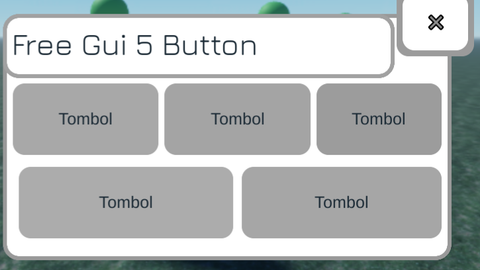
Free Gui 5 Button by ninja
Universal Script 📌
NinjastrongPublished 10
9 months ago
Please login to perform these actions:Does it work?
No reports yetNo reports yet. Tried it? Be the first to say.
Also noticed:
Description
You can skid the gui i Hope it is useful
local LMG2L = {};

LMG2L["ScreenGui_1"] = Instance.new("ScreenGui", game:GetService("Players").LocalPlayer:WaitForChild("PlayerGui"));
LMG2L["ScreenGui_1"]["ZIndexBehavior"] = Enum.ZIndexBehavior.Sibling;

LMG2L["Frame_2"] = Instance.new("Frame", LMG2L["ScreenGui_1"]);
LMG2L["Frame_2"]["BorderSizePixel"] = 0;
LMG2L["Frame_2"]["BackgroundColor3"] = Color3.fromRGB(255, 255, 255);
LMG2L["Frame_2"]["Size"] = UDim2.new(0, 296, 0, 160);
LMG2L["Frame_2"]["Position"] = UDim2.new(0, 168, 0, 28);

LMG2L["UICorner_3"] = Instance.new("UICorner", LMG2L["Frame_2"]);

LMG2L["UIStroke_4"] = Instance.new("UIStroke", LMG2L["Frame_2"]);
LMG2L["UIStroke_4"]["Thickness"] = 2.5;
LMG2L["UIStroke_4"]["Color"] = Color3.fromRGB(153, 153, 153);

LMG2L["Frame_5"] = Instance.new("Frame", LMG2L["Frame_2"]);
LMG2L["Frame_5"]["BorderSizePixel"] = 0;
LMG2L["Frame_5"]["BackgroundColor3"] = Color3.fromRGB(155, 155, 155);
LMG2L["Frame_5"]["Size"] = UDim2.new(0, 52, 0, 46);
LMG2L["Frame_5"]["Position"] = UDim2.new(0, 262, 0, -20);

LMG2L["UICorner_6"] = Instance.new("UICorner", LMG2L["Frame_5"]);

LMG2L["TextButton_7"] = Instance.new("TextButton", LMG2L["Frame_2"]);
LMG2L["TextButton_7"]["BorderSizePixel"] = 0;
LMG2L["TextButton_7"]["TextSize"] = 14;
LMG2L["TextButton_7"]["TextColor3"] = Color3.fromRGB(140, 140, 140);
LMG2L["TextButton_7"]["BackgroundColor3"] = Color3.fromRGB(255, 255, 255);
LMG2L["TextButton_7"]["Size"] = UDim2.new(0, 44, 0, 38);
LMG2L["TextButton_7"]["Text"] = [[×]];
LMG2L["TextButton_7"]["Position"] = UDim2.new(0, 266, 0, -16);

LMG2L["UICorner_8"] = Instance.new("UICorner", LMG2L["TextButton_7"]);

LMG2L["UIStroke_9"] = Instance.new("UIStroke", LMG2L["TextButton_7"]);

LMG2L["Frame_a"] = Instance.new("Frame", LMG2L["Frame_2"]);
LMG2L["Frame_a"]["BorderSizePixel"] = 0;
Comments
0Log in to join the conversation. Login
No comments yet. Be the first!