1.1k Views
714 Executions
FloatFly fly bypass (PATCHED)
Universal Script 📌
qsaqFirst script
9 months ago
Please login to perform these actions:Does it work?
No reports yetNo reports yet. Tried it? Be the first to say.
Also noticed:
Description
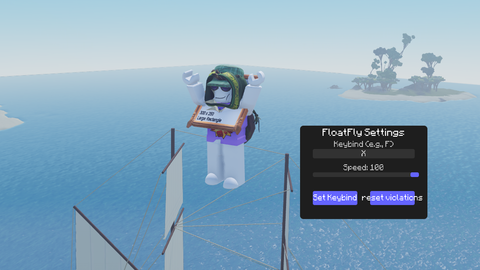
Hi! This is a universal script that can be used on any executioner, and it also bypasses an anti-cheats. The script is currently in beta, and yes, it's open source, so you can modify it however you like. To ensure the script works correctly, enter your key in the keybind field and press "set keybind." After this key, you can enable or disable the script. Now, to fly, simply hold down the spacebar. Also, set the speed that suits you in advance. (Sorry for any mistakes, I'm using a translator)
local UserInputService = game:GetService("UserInputService")
local Players = game:GetService("Players")

local player = Players.LocalPlayer
local character = player.Character or player.CharacterAdded:Wait()
local humanoid = character:WaitForChild("Humanoid")
local humanoidRootPart = character:WaitForChild("HumanoidRootPart")

-- Create GUI for keybind and speed setting
local screenGui = Instance.new("ScreenGui")
screenGui.Parent = player:WaitForChild("PlayerGui")
screenGui.IgnoreGuiInset = true

local frame = Instance.new("Frame")
frame.Parent = screenGui
frame.Size = UDim2.new(0, 300, 0, 220)
frame.Position = UDim2.new(0.5, -150, 0.5, -110)
frame.BackgroundColor3 = Color3.fromRGB(30, 30, 30)
frame.BorderSizePixel = 0
frame.Active = true

-- Add rounded corners
local uiCorner = Instance.new("UICorner")
uiCorner.CornerRadius = UDim.new(0, 8)
uiCorner.Parent = frame

-- Title label
local titleLabel = Instance.new("TextLabel")
titleLabel.Parent = frame
titleLabel.Size = UDim2.new(1, 0, 0.15, 0)
titleLabel.BackgroundTransparency = 1
titleLabel.Text = "FloatFly Settings"
titleLabel.TextColor3 = Color3.fromRGB(255, 255, 255)
titleLabel.TextSize = 18
titleLabel.Font = Enum.Font.GothamBold

-- Keybind label and textbox
local keyLabel = Instance.new("TextLabel")
keyLabel.Parent = frame
keyLabel.Size = UDim2.new(1, 0, 0.1, 0)
Comments
0Log in to join the conversation. Login
No comments yet. Be the first!