1.7k Views
30 Executions

Does it work?
No reports yetNo reports yet. Tried it? Be the first to say.
Also noticed:
Description
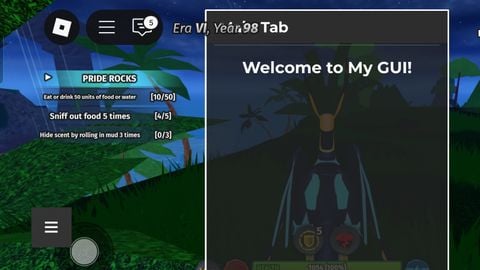
Its a free modifyable GUI, Its an easy to use GUi that anyone can access, if your making scripts or other things you might need ts etc. And ill be posting this raw so you can change some stuff in it if you dislike it, added instructions in the gui for you to follow and understand
local player = game.Players.LocalPlayer
local screenGui = Instance.new("ScreenGui")
screenGui.Name = "FinderGUI"
screenGui.ResetOnSpawn = false
screenGui.Parent = player:WaitForChild("PlayerGui")

-- Loading screen
local loadingScreen = Instance.new("Frame")
loadingScreen.Size = UDim2.new(1, 0, 1, 0)
loadingScreen.Position = UDim2.new(0, 0, 0, 0)
loadingScreen.BackgroundColor3 = Color3.fromRGB(34, 34, 34)
loadingScreen.BackgroundTransparency = 0.5
loadingScreen.BorderSizePixel = 0
loadingScreen.Parent = screenGui

local loadingText = Instance.new("TextLabel")
loadingText.Size = UDim2.new(0, 300, 0, 50)
loadingText.Position = UDim2.new(0.5, -150, 0.5, -25)
loadingText.Text = "Finder"
loadingText.TextColor3 = Color3.fromRGB(255, 255, 255)
loadingText.BackgroundTransparency = 1
loadingText.TextSize = 36
loadingText.Font = Enum.Font.GothamBold
loadingText.Parent = loadingScreen

-- Main GUI (hidden initially)
local mainFrame = Instance.new("Frame")
mainFrame.Size = UDim2.new(0, 300, 0, 400)
mainFrame.Position = UDim2.new(0.5, -150, 0.5, -200)
mainFrame.BackgroundColor3 = Color3.fromRGB(34, 34, 34)
mainFrame.BackgroundTransparency = 0.2
mainFrame.BorderSizePixel = 0
mainFrame.Visible = false
mainFrame.Parent = screenGui

local uiStroke = Instance.new("UIStroke")
uiStroke.Thickness = 2
uiStroke.Color = Color3.fromRGB(255, 255, 255)
uiStroke.Parent = mainFrame





4§