2.1k Views
113 Executions

Does it work?
No reports yetNo reports yet. Tried it? Be the first to say.
Also noticed:
Description
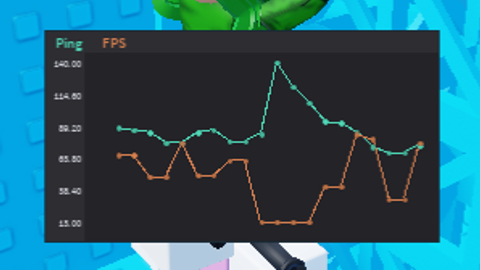
FPS n Ping Graph V2 by me (Originally by Stefanuk12) Features by me: [Added] Close key " x " to close gui [Added] Smooth Dragging Open Source
--[[
    Information:

    A graphical representation of your FPS and ping in game.

	Credits:

	https://devforum.roblox.com/t/graph-module-easily-draw-graphs-of-your-data/828982 - GraphModule
]]

-- // Configuration
local UpdateDelay = 0.5 -- // second(s)
local MaxDataPoints = 20

-- // Dependencies
local GraphModule
do
    --[=[

    Docs: https://devforum.roblox.com/t/graph-module-easily-draw-graphs-of-your-data/828982/1

    API:

    function Graph.new(Frame)
        returns a GraphHandler

    GraphHandler.Resolution = The number of points it renders
    GraphHandler.BaselineZero = Whether the bottom of the graph should start at zero (or at the minimum value)
    GraphHandler.Data = The dictionary of data sets
        (Data must be a dictionary of arrays with no holes)

    function GraphHandler.Theme(ThemeDictionary)
        Updates the Colors of the graph

    --]=]

	local TextService = game:GetService("TextService")

	local Graph = {}


chatgpt hi
@rocketscript eww chatgpt, that's the worst ai