
37.3k Views
1.2k Executions

Does it work?
No reports yetNo reports yet. Tried it? Be the first to say.
Also noticed:
Description
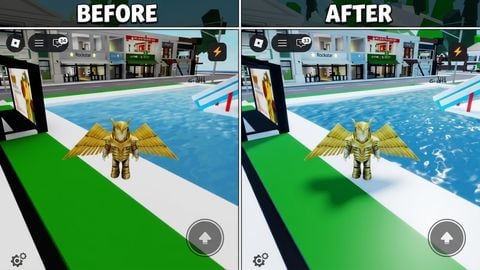
cool script by RIP#6666 that i wanted to publicize discord.gg/rips slap this script in ur auto execute Removes the following: - Meshes - Clothing (not classic) - Particles - Camera FX - Explosions - Water Quality - Shadows Enables - Low Rendering - Low Quality Parts
Updates
Script edited: Create script
-- Script Name : FPS Booster
--[[Script Updates :
    [+] Changed Table Look (Added Other)
]]
-- Script :
-- Made by RIP#6666
_G.Settings = {
    Players = {
        ["Ignore Me"] = true, -- Ignore your Character
        ["Ignore Others"] = true -- Ignore other Characters
    },
    Meshes = {
        Destroy = false, -- Destroy Meshes
        LowDetail = true -- Low detail meshes (NOT SURE IT DOES ANYTHING)
    },
    Images = {
        Invisible = true, -- Invisible Images
        LowDetail = false, -- Low detail images (NOT SURE IT DOES ANYTHING)
        Destroy = false, -- Destroy Images
    },
    Other = {
        ["No Particles"] = true, -- Disables all ParticleEmitter, Trail, Smoke, Fire and Sparkles
        ["No Camera Effects"] = true, -- Disables all PostEffect's (Camera/Lighting Effects)
        ["No Explosions"] = true, -- Makes Explosion's invisible
        ["No Clothes"] = true, -- Removes Clothing from the game
        ["Low Water Graphics"] = true, -- Removes Water Quality
        ["No Shadows"] = true, -- Remove Shadows
        ["Low Rendering"] = true, -- Lower Rendering
        ["Low Quality Parts"] = true -- Lower quality parts
    }
}
loadstring(game:HttpGet("https://raw.githubusercontent.com/CasperFlyModz/discord.gg-rips/main/FPSBooster.lua"))()





how do I use them do I put in micro profiler?
note u can edit these settings as u want