105.1k Views
650 Executions
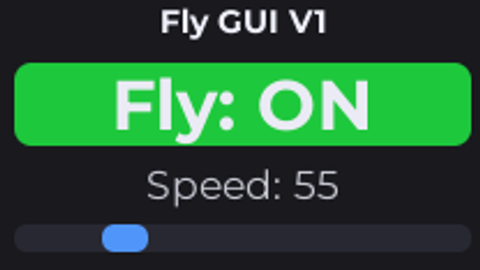
FLY GUI V1
Universal Script 📌
CK5c00lkiddPublished 10
1 year ago
Please login to perform these actions:Does it work?
No reports yetNo reports yet. Tried it? Be the first to say.
Also noticed:
Description
pro
local Players = game:GetService("Players")
local UIS = game:GetService("UserInputService")
local RunService = game:GetService("RunService")
local plr = Players.LocalPlayer

local gui = Instance.new("ScreenGui")
gui.Name = "fly gui v1"
gui.ResetOnSpawn = false
gui.Parent = plr:WaitForChild("PlayerGui")

local frame = Instance.new("Frame")
frame.Size = UDim2.new(0,220,0,160)
frame.Position = UDim2.new(0.05,0,0.25,0)
frame.BackgroundColor3 = Color3.fromRGB(25,25,30)
frame.Active = true
frame.Parent = gui
Instance.new("UICorner",frame).CornerRadius = UDim.new(0,12)

local title = Instance.new("TextLabel",frame)
title.Size = UDim2.new(1,0,0,24)
title.Text = "Fly GUI V1"
title.Font = Enum.Font.GothamBold
title.TextSize = 16
title.TextColor3 = Color3.fromRGB(240,240,250)
title.BackgroundTransparency = 1

local toggle = Instance.new("TextButton",frame)
toggle.Size = UDim2.new(0.9,0,0,36)
toggle.Position = UDim2.new(0.05,0,0,30)
toggle.Text = "Fly: OFF"
toggle.Font = Enum.Font.GothamBold
toggle.TextScaled = true
toggle.TextColor3 = Color3.fromRGB(235,235,245)
toggle.BackgroundColor3 = Color3.fromRGB(35,35,40)
Instance.new("UICorner",toggle).CornerRadius = UDim.new(0,8)

local speedLabel = Instance.new("TextLabel",frame)
speedLabel.Size = UDim2.new(0.9,0,0,20)
speedLabel.Position = UDim2.new(0.05,0,0,72)
speedLabel.Text = "Speed: 50"
Comments
0Log in to join the conversation. Login
No comments yet. Be the first!