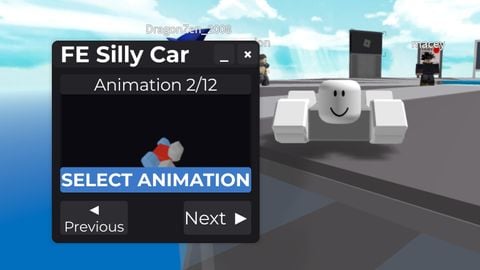
FE SILLY CAR V1.35
Does it work?
No reports yetNo reports yet. Tried it? Be the first to say.
Description
ChangeLog: V 1.35 : Now you can mix it with walkfling V 1.3 : small gui update V 1.2 : small fix, added pc support V 1.1 : added sway to position/rotation Pls don't steal or put keysytem on it Its A goofy little car script I made using UGC emotes. (ONLY WORKS ON R15) - It makes gui for you to select the animation and preview the anims - Its changeable - when closed, it stopped the script and the animation have 12 modes for now, but I plan to update it like more animations if there is.. And I’m thinking… something more interactive, just to really boost the silly vibes. whatever ‘silly’ even means Also i dont really understands pc maybe I'll just do the pc support like right left and return/enter Also K to hide the gui
local Players = cloneref(game:GetService("Players"))
local StarterGui = cloneref(game:GetService("StarterGui"))
local UserInputService = cloneref(game:GetService("UserInputService"))
-- Made By @Gazer_ha. pls dont steal or put keysytem on it

local uScale = function(xScale, yScale)
local screen = workspace.CurrentCamera.ViewportSize
return UDim2.new(0, screen.X * xScale, 0, screen.Y * (yScale or xScale)) end

local uPos = function(xScale, yScale)
local screen = workspace.CurrentCamera.ViewportSize
return UDim2.new(0, screen.X * xScale, 0, screen.Y * yScale) end

local uSize = function(widthScale, heightScale)
local screen = workspace.CurrentCamera.ViewportSize
return UDim2.new(0, screen.X * widthScale, 0, screen.Y * (heightScale or widthScale)) end

--[[ Example usage for the uSize and uPos:
frame.Position = uScale(0.4, 0.5)  # 40% from left, 50% from top
frame.Size = uSize(0.3)            # 30% of screen width and height (square)

# For buttons or non-square elements

button.Position = uPos(0.8, 0.9)   # 80% from left, 90% from top
button.Size = uSize(0.15, 0.08)    # 15% width, 8% height
]]

 createNotification = function(title, text, duration)
    local notificationGui = Instance.new("ScreenGui", cloneref(game:GetService("CoreGui")))
    notificationGui.Name = "EnhancedNotification"
    notificationGui.ResetOnSpawn = false

    local mainFrame = Instance.new("Frame", notificationGui)
    mainFrame.Size = uSize(0.25, 0.15)
    mainFrame.Position = UDim2.new(0.75, 0, 0.05, 0)
    mainFrame.BackgroundColor3 = Color3.fromRGB(25, 25, 30)
    mainFrame.BorderSizePixel = 0

    local corner = Instance.new("UICorner", mainFrame)
    corner.CornerRadius = UDim.new(0, 8)
swaston fe plz
Can you add this car it's a tank rbx*etid://92101197608297
Yes?
is this available for pc?
You can close the script i fixed the characteradded listener lol
can u make it u can be normal
I think i fixed it now