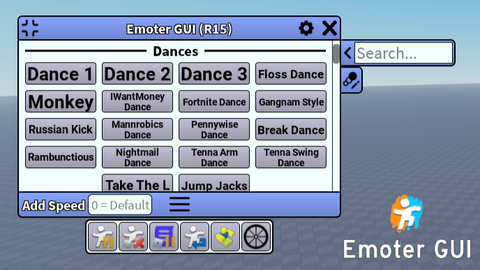
Emoter GUI - an Ultimate animations GUI (R6/R15)
Reviewed by QueueSherlockPaid revieweron How review works
Does it work?
No reports yetNo reports yet. Tried it? Be the first to say.
Description
Emoter is a FE GUI with a lot of animations you can play while moving, sitting or other things. This GUI doesn't give you any Advantages and made to have fun. Dance without any problems and restrictions! More information and instructions in my Github: https://github.com/Fixel656/Emoter-GUI_Roblox-Animations-Script What this Gui can do? - Play FE animations (43 R6 animations AND more than 100 R15 animations) - Highly configurable Button and animation functions - Abibily to change animation speed - All animations have Action3 or Action4 priority so it wont be replaced or conflicting with default animations - You can loop unlooped anims by clicking RMB on them - Preview animation by hovering on it's button - Cool options: Pausing all animations, stopping all default animations, pausing default "Animate" script, falling and reversing animations - Color themes - Ability to use animation by entering its ID - Added SGA - SpecificGameAnimations: file with Animations for specific games. It will be places with emotes available in these places specifically. I will add it manually and type available ones in README. Also you can add files for yourself in your files folder. More information here. (You can add your SGA in Discussions so i can add it to Github) - "Running" and "Idle" types for animations. "Running" type will change AnimationSpeed depending on the character's speed and stop when character isn't moving (staying). "Idle" type will play whed you're staying. It has a lot of configurations, so check more info on how to use it in my Wiki - Emote wheel (Activate by , button. You can't edit emotes for it in Gui itself (at least for now), You'll need to edit files in EmoterData folder. - Hotkeys with Double hotkey support - More - Added SGA - SpecificGameAnimations: file with Animations for specific games. It will be places with emotes available in these places specifically. I will add it manually and type available ones in README. Also you can add files for yourself in your files folder. - "Running" and "Idle" types for animations. "Running" type will change AnimationSpeed depending on the character's speed and stop when character isn't moving (staying). "Idle" type will play whed you're staying. It has a lot of configurations, so check more info on how to use it in my Wiki - Emote wheel (Activate by , button. You can't edit emotes for it in Gui itself (at least for now), You'll need to edit files in EmoterData folder. This is my first script after some experience in Roblox programming, hope you like it!



phenomenal stuff, do you have any plans of adding in stuff like jumping and falling anim?
@familyfeudfan Oh yeah! I want to make Animation Bundle system so you can play all animations of one bundle on one click, including jump and falling. Maybe also i will add replace animation feature with it, but who knows. But first, I need to make a script showcase video for YouTube.
W Script Keep It Up :D
@l4qic Thank you!