ESP (semi universal)
Universal Script 📌
Reviewed by QueueSherlockPaid revieweron How review works
Does it work?
Early reports0% say it works · 1 report in the last 2 weeks
Description
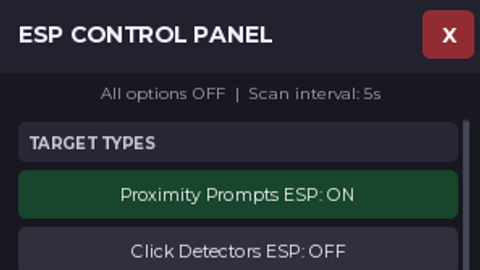
1. ESP target types These all start OFF and can be enabled individually. - Proximity Prompts ESP — highlights objects with ProximityPrompt instances. - Click Detectors ESP — highlights objects with ClickDetector instances. - Tagged Interactables ESP — finds objects tagged Interactable using CollectionService. - Collectibles ESP — searches for names containing coin, currency, collectible, token, or gem. - Tools ESP — highlights Tool instances. - Unanchored Parts ESP — highlights parts that aren't anchored. 2. Visual options - Show Highlights — adds colored outlines and fills to detected objects. - Show Labels — displays the object's name above it. - Show Distance — displays the distance from your character in studs. - Through Walls — allows highlights and labels to appear through walls. - Red After Interaction — changes a tracked object's highlight to red after you interact with it. 3. Color customization The color button cycles through five colors: Cyan Red Green Yellow Purple 4. GUI controls - Draggable window — drag the panel by its title bar. - X button — closes the GUI and stops its scanning loop. - KILL GUI — also closes the GUI, disconnects tracked interaction listeners, and removes tracked ESP visuals. - Scan Now — immediately scans the Workspace. - Clear Interaction History — clears remembered interactions so objects can return to their normal color on the next scan. - Disable All ESP — turns off the ESP target types and visual options. 5. Performance features - All ESP options start OFF, reducing unnecessary initial scanning. - Automatic scanning every 5 seconds rather than scanning continuously every frame. - No continuous RenderStepped scanning. - No full ESP scan when all target types are disabled. - Visuals are reused between scans when possible instead of recreated every time. 6. Prompt control - Enable Prompts Locally — toggles ProximityPrompt.Enabled on the client. - This affects the local client only; it does not change the server's prompt settings for everyone. Important limitations A few details about the current script: - The interaction-red feature depends on the relevant interaction listener being connected and the target being tracked. - The distance label updates during scans, so it may not update smoothly between scans. - Disable All ESP doesn't disable the separate prompt-control toggle. - The collectible finder uses object names, not a game's actual currency or collectible system. - Through-walls visibility depends on Roblox's Highlight and BillboardGui rendering behavior.
--[[
  CLIENT ESP CONTROL PANEL — REFINED
  Original features preserved. Performance caps, cleanup, and local prompt restoration added.
  Run as a LocalScript in Roblox Studio for an experience you own or have permission to test.
  All ESP categories begin disabled. Teleports are client-side and may be corrected by the server.
]]

--// CLIENT ESP CONTROL PANEL
--// Original-style GUI + newer functions + Waypoints
--// All ESP toggles start OFF
--// Automatic scan every 5 seconds
--// Draggable window
--// Kill GUI stops scanning and removes ESP visuals and waypoints

local Players = game:GetService("Players")
local Workspace = game:GetService("Workspace")
local CollectionService = game:GetService("CollectionService")
local UserInputService = game:GetService("UserInputService")
local RunService = game:GetService("RunService")
local Lighting = game:GetService("Lighting")
local Stats = game:GetService("Stats")
local TeleportService = game:GetService("TeleportService")

local player = Players.LocalPlayer
local playerGui = player:WaitForChild("PlayerGui")

local SCAN_INTERVAL = 5
local PROX_UPDATE_INTERVAL = 1
local PLAYER_UPDATE_INTERVAL = 0.5
local MAX_ESP_TARGETS = 150
local previousShutdown = _G.__ClientESPPanelShutdown
if type(previousShutdown) == "function" then
    pcall(previousShutdown)
end
local running = true
local scanQueued = false
local scanning = false
local MAX_WAYPOINTS = 25

local OPTIONS = {