76 Views
10 Executions
DarkRed Ultimate v2 gui f3x (now the name is DarkRed no Dr2)
Universal Script 📌
2 days ago · Updated
Reviewed by QueueSherlockPaid revieweron How review works
Does it work?
Early reports100% say it works · 1 report in the last 2 weeks
Also noticed:
Description
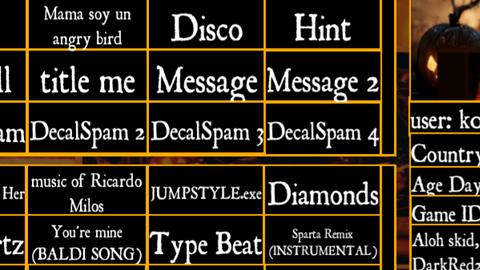
GUI V2 IS HEREEEEEEEEEEEEEEEEE!!!!!!!!!!!!!!!!!
-- // INSTANCES: 167 | SCRIPTS: 68 | MODULES: 0 \\ --

local UI = {}

-- // StarterGui.ScreenGui \\ --
UI["1"] = Instance.new("ScreenGui", game:GetService("Players").LocalPlayer:WaitForChild("PlayerGui"))
UI["1"]["ZIndexBehavior"] = Enum.ZIndexBehavior.Sibling

-- // StarterGui.ScreenGui.ImageLabel \\ --
UI["2"] = Instance.new("ImageLabel", UI["1"])
UI["2"]["BorderSizePixel"] = 2
UI["2"]["BackgroundColor3"] = Color3.fromRGB(0, 0, 0)
UI["2"]["ImageTransparency"] = 0.54
-- [ERROR] cannot convert ImageContent
UI["2"]["Image"] = [[rbxassetid://2446234250]]
UI["2"]["Size"] = UDim2.new(0, 767, 0, 437)
UI["2"]["BorderColor3"] = Color3.fromRGB(255, 171, 0)
UI["2"]["Position"] = UDim2.new(0.192, -14, 0.11079, 5)

-- // StarterGui.ScreenGui.ImageLabel.information \\ --
UI["3"] = Instance.new("Frame", UI["2"])
UI["3"]["BorderSizePixel"] = 2
UI["3"]["BackgroundColor3"] = Color3.fromRGB(0, 0, 0)
UI["3"]["Size"] = UDim2.new(0, 241, 0, 436)
UI["3"]["Position"] = UDim2.new(0.68528, 0, 0.00229, 0)
UI["3"]["Name"] = [[information]]
UI["3"]["BorderColor3"] = Color3.fromRGB(255, 171, 0)

-- // StarterGui.ScreenGui.ImageLabel.information.user \\ --
UI["4"] = Instance.new("TextLabel", UI["3"])
UI["4"]["TextWrapped"] = true
UI["4"]["BorderSizePixel"] = 2
UI["4"]["TextXAlignment"] = Enum.TextXAlignment.Left
UI["4"]["TextStrokeColor3"] = Color3.fromRGB(255, 255, 255)
UI["4"]["TextSize"] = 24
UI["4"]["TextScaled"] = true
UI["4"]["BackgroundColor3"] = Color3.fromRGB(0, 0, 0)
UI["4"]["TextColor3"] = Color3.fromRGB(255, 255, 255)
UI["4"]["FontFace"] = Font.new([[rbxasset://fonts/families/RomanAntique.json]], Enum.FontWeight.Regular, Enum.FontStyle.Normal)
UI["4"]["Size"] = UDim2.new(0, 241, 0, 36)
Comments
0Log in to join the conversation. Login
No comments yet. Be the first!