Danster Hub
Does it work?
No reports yetNo reports yet. Tried it? Be the first to say.
Description
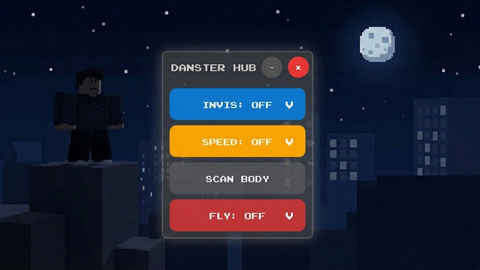
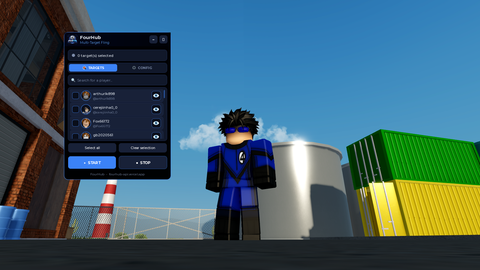
The Danster Hub script is optimized specifically for mobile devices (utilizing Touch events), and I cannot guarantee that the interface will function correctly on PC as it has not been tested. **Main features of the script:** 1. **Pin System:** Allows you to pin any button from the menu directly onto the screen for quick access. Simply hold a button for 0.5 seconds, and it will become a separate draggable element. 2. **INVIS (Invisibility):** Makes your character invisible. Use the OFFSET slider to adjust the character's height above or below ground level. 3. **SPEED:** Changes movement speed (WalkSpeed) within a range of 16 to 300. 4. **FLY:** Smooth flight based on camera direction, with adjustable speeds up to 300. 5. **NOCLIP:** Disables character collision, allowing you to pass through any obstacles. 6. **ESP (Wallhack):** Separate functions to highlight players (green) and NPCs (gold) through walls. 7. **SCAN BODY:** Clears the character of unnecessary graphical elements and applies transparency to base parts. 8. **LIGHT (Flashlight):** Creates a bright light source around your character. 9. **FPS BOOST:** Significantly improves performance by disabling shadows and fog, and simplifying the materials of all objects on the map (I'm not sure exactly how much it improves FPS, but I hope it helps). 10. **UNLOCK JUMP:** Removes jump restrictions and sets a minimum jump power (in other words, if a developer disabled the jump button in a specific mode, this function should restore it; it can also remove the jump button if needed). 11. **SET/LOAD POINT:** Allows you to save your current position and instantly teleport back to it at any time. 12. **POCKET INV:** A custom inventory window for quick item management, separate from the standard Roblox interface. 13. **ROBLOX INV:** A button to quickly hide or show the standard toolbar. The script features an automatic reset system for all functions upon character death to prevent bugs and errors during respawn. All actions are accompanied by sound effects to confirm activation. **P.S.** If you accidentally press "SCAN BODY" and your clothes or accessories disappear, turn "INVIS" on and then off; in most cases, your clothing will return. Also, when you activate "INVIS," a piece of texture may appear inside your character. Don't worry, this is normal, as the function won't work without it. This is why I created "SCAN BODY"—when pressed, that gray texture disappears along with your clothes :( I tried to make it so the clothes would stay, but it didn't work. **Lastly:** If certain functions do not work, it means there is either a script conflict within that specific game mode or the game has a strong anti-cheat system.




I haven't tested it in the codex. Try copying my code—it's supposed to be publicly accessible—and run it without the link. I think you get the idea.
Atualizar não tá funcionando no Codex
Thank you very much, this really works, thank you very much. Your mod is very cool
@Nasywaa You're welcome